Table of Contents

Key Takeaways

  • Clio’s document management is enough when a matter’s documents and email all live in Clio; otherwise, add a DMS beside Clio.

  • Time, billing and tasks stay in Clio, while LexWorkplace becomes the system of record for a matter’s documents and email.

  • Matter email in personal inboxes and a Dropbox kept beside Clio are signs a firm has outgrown Clio’s document tools.

  • LexWorkplace has no client upload portal or real-time co-editing, so firms that need either keep Clio for Clients or Microsoft 365 co-authoring.

  • Moving to LexWorkplace usually means bringing a firm’s documents out of Clio and other storage so each matter’s file lives in one system.

Clio has document management. Every matter in Clio Manage has a place for its files, Clio Drive puts those files on your desktop, and plenty of firms run on Clio document management without a second system.

Other Clio firms keep a Dropbox, a shared drive or a folder of email in someone’s inbox running beside it. Then a vendor tells you that’s a sign you need a document management system, and you’re left wondering whether it’s true.

It’s a fair question, and the honest answer depends on how your firm works. Clio is built to run the practice: time, billing, tasks and the calendar. The decision is whether it should also be the home for every document and email a matter produces.

Clio stays in every version of the answer. What you’re choosing is where your client file lives.

Table of Contents

Does Clio Have Document Management?

Yes. Clio Manage includes document management, and Clio’s legal document features give every matter unlimited storage, search across file names, text and metadata, and desktop access through Clio Drive. For a firm whose documents are mostly attachments to the matter, that covers a lot of ground.

The difference between practice management and document management comes down to how much your firm asks of its files. Clio’s tools are built into a practice management system, and here’s what they include.

What Clio’s Document Tools Cover

Clio describes its document tools in five groups:

  • Storage: unlimited document storage, including video, image, text and audio files, with a full version history for each file

  • Search: find a file by terms in its title, text or metadata, or sort by category, folder, author and date

  • Desktop access: Clio Drive, a virtual drive on Windows and Mac, and Clio Launcher, which opens files in Word or Adobe Reader and saves changes back to Clio

  • Scanning: Fujitsu ScanSnap scanning straight into Clio

  • Signing and filing: e-signatures, court filing and service of legal papers from the matter

For AI drafting and advanced document automation, Clio offers Clio Draft, which our Clio Draft review covers in detail.

Where Clio Keeps a Matter’s Email

Clio’s Outlook add-in files emails, threads and attachments to a matter, where the emails show up in the matter’s Communications and the attachments in its Documents. If Clio is your firm’s only system, that’s where a matter’s email lives.

That’s the setup to compare any other system against. The question is whether everything your firm produces for a matter ends up there.

Document and email audit score badge

FREE WORKFLOW AUDIT

Is your email and document system helping — or slowing your firm down?

A quick self-assessment that scores where email and document friction is costing your firm time, and shows you where to fix it first.

Five Signs Your Firm Has Outgrown Clio’s Document Tools

Your firm has outgrown Clio’s document tools when a matter’s file no longer lives in one place you can search. Each sign below describes a matter file that has spread beyond Clio, and you can check every one of them at your own firm this week.
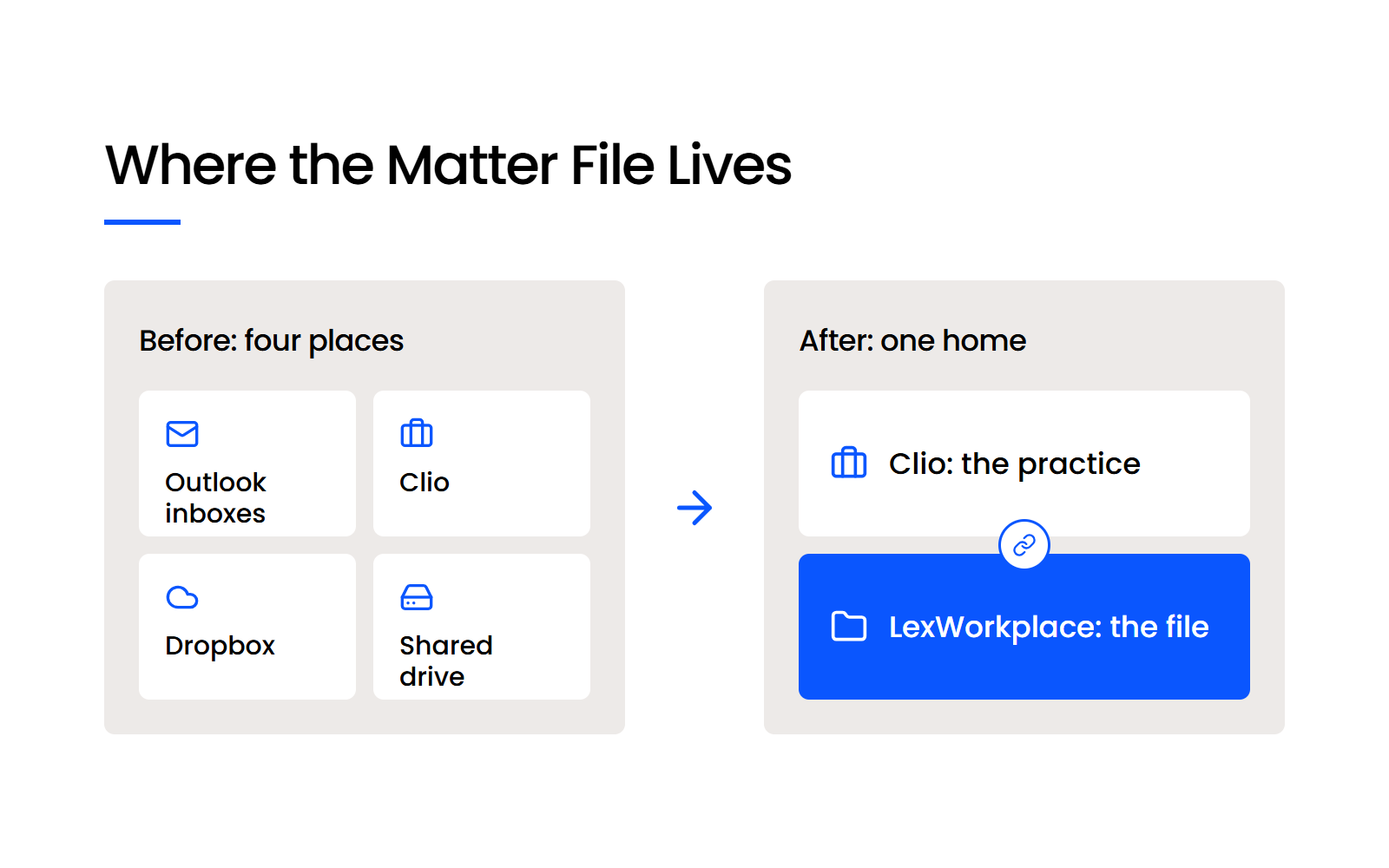
Before: a matter's file in Outlook, Clio, Dropbox and a shared drive. After: Clio for the practice, LexWorkplace for the file

Check your firm against the first two signs:

  • 1. Email about the matter sits in personal inboxes. When a client’s instructions and opposing counsel’s offers stay with whoever received them, the matter file is incomplete whenever that person is out. LexWorkplace for Outlook files email to the matter from an Outlook sidebar, and Email Smart-File learns which senders belong to which matter.

  • 2. Finding one matter’s file means searching several places. Staff check Outlook, then a shared drive, then Clio, and still aren’t sure they’ve found everything. A full-text search across a matter’s documents and email in one system ends that hunt.

A split file turns every lookup into three searches, and each extra search is another chance to miss something.

❝

Now I have to run a search on my Outlook, then in our file system, then maybe our practice management tool. That’s a thick, clunky process, and you’re going to miss stuff sometimes.

— Dennis Dimka, Founder, LexWorkplace

The next three signs are about where files go and what happens to them once they’re there:

  • 3. You keep a second store “just for documents.” A Dropbox, a shared drive or a OneDrive folder running beside Clio gives every document two possible homes, and nobody’s sure which copy is current. Firms we talk to describe this setup when they first ask whether they need a DMS.

  • 4. Getting large files to outside parties is awkward. A senior associate attorney reviewing Clio on Capterra wrote that “there is no easy way to share large files with people you do not want to give access to your file.” LexWorkplace sends documents outside the firm as a secure link that stays active for 30 days, can be revoked sooner and can require a password.

  • 5. Two people need the same document at once. When a colleague opens a pleading you’re still editing, someone ends up merging changes by hand. LexWorkplace’s version history and check-out lock a document while it’s open, let a user check it out so nobody else can change it, and save a new version on every save by default.

The more of these describe your firm, the stronger the case for giving the file its own home beside Clio.

Bring Law and Order to Your Documents

LexWorkplace Includes:

  • Document Profiling / Metadata

  • Structured by Client/Matter

  • Organize With Folders and Tags

  • Save Emails to Matters

  • Built-In Version Management

  • Add Notes to Docs & Email

  • Automatic, Integrated OCR (Advanced Plan)

When Is Clio Alone Enough for Your Documents?

Clio alone is enough when every document and email for a matter already lives in Clio and your staff find what they need there. Plenty of Clio users are happy with it: a paralegal reviewing Clio on Capterra called its document management “reliable and easy to use, making it simple to keep case files organized and accessible.”

The simple storage inside a practice management app fits simple needs well. As those needs grow, more firms, midsize ones included, move their documents into a dedicated document management system.

Clio alone is enough for your documents if all of these are true:

  • Every document and email for a matter already lives in Clio

  • Nobody at your firm keeps a Dropbox or shared drive on the side

  • Your staff find what they need with Clio’s search

  • Your matters don’t produce the volume of email and scanned paper that makes one search across everything worth having

LexWorkplace has limits worth knowing before you add it. It has no client upload portal, since it sends documents out by secure link and doesn’t take uploads back, so a firm that needs clients to upload files keeps a portal for that, such as Clio for Clients, where clients upload documents to the firm. It has no real-time co-editing either: one person edits a document at a time, and firms that draft together live use Microsoft 365 co-authoring for that stage.
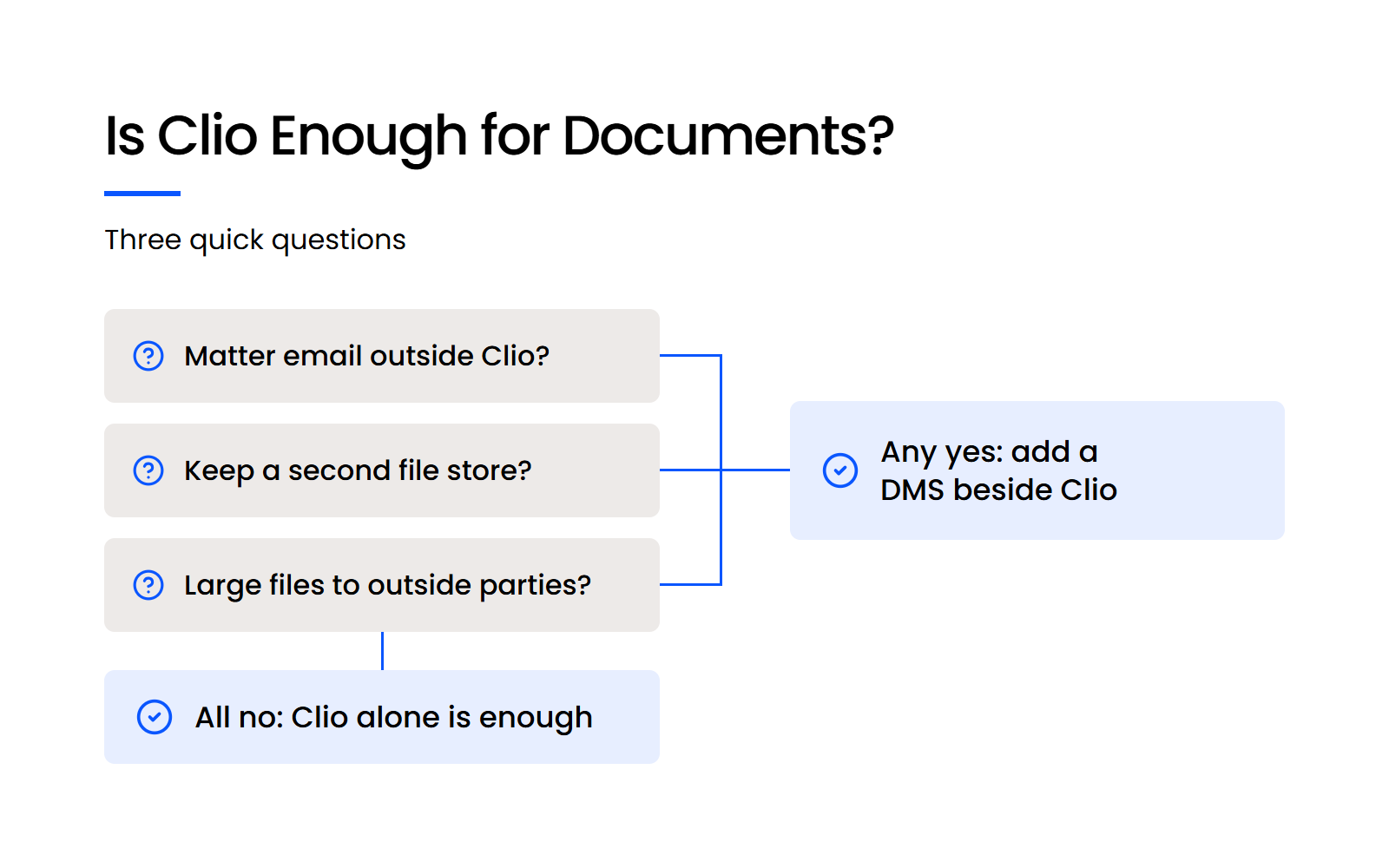
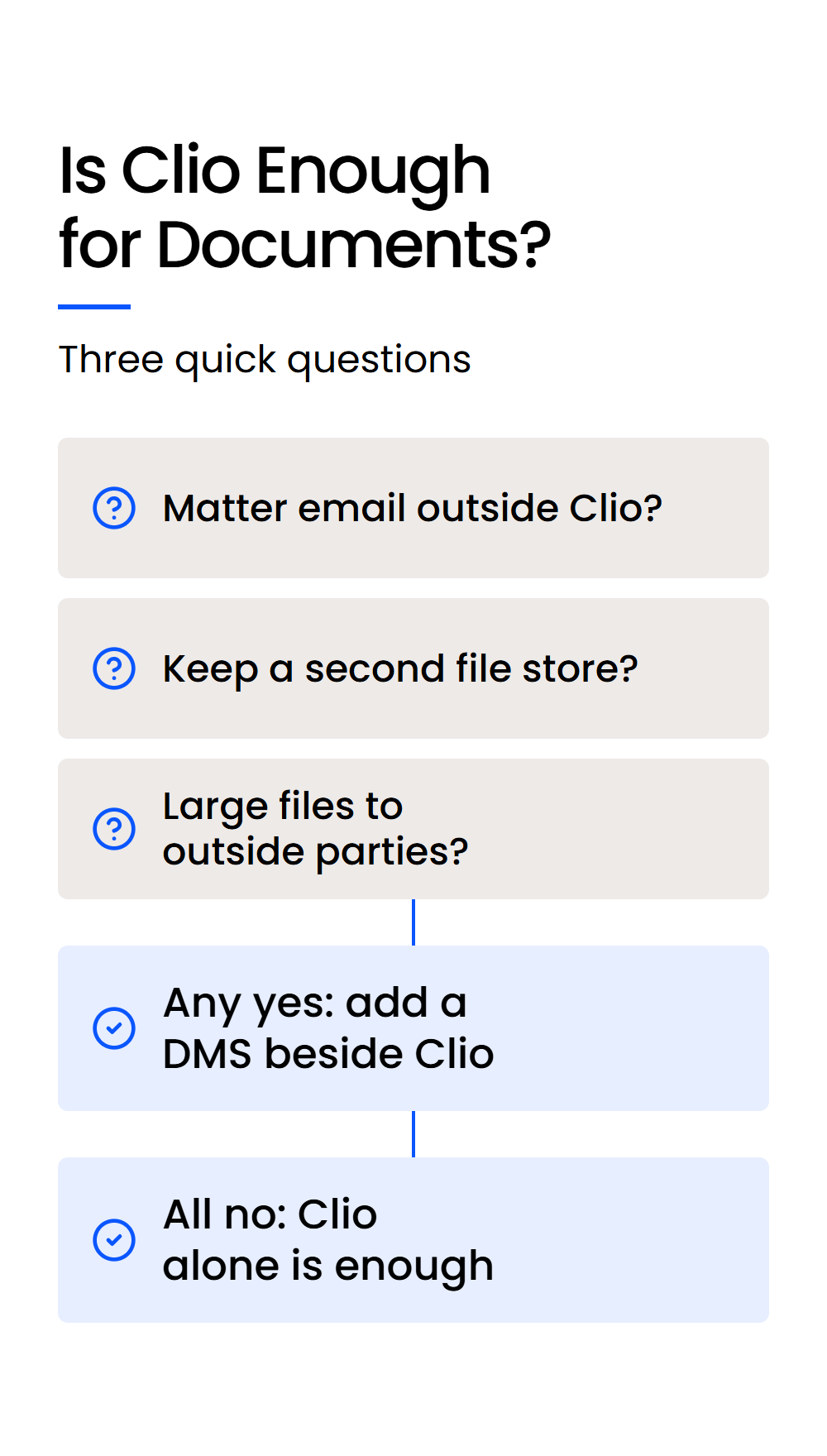
Decision tree: three questions about email, a second file store and large files decide whether Clio alone is enough

How Does a Clio Firm Split the Work with LexWorkplace?

A Clio firm that adds LexWorkplace keeps Clio as the system of record for the practice and makes LexWorkplace the system of record for the file, with the Clio matter linking the two. Both are among the most widely adopted cloud tools at law firms: the ABA’s 2024 Legal Technology Survey Report found that 73% of firms use cloud-based legal tools, with document management and practice management software the most widely adopted.

Which System Holds Each Part of a Matter?

The split gives each system one job. Here’s which system holds each part of a matter when your firm runs Clio and LexWorkplace together:

Which System Holds Each Part of a Matter

Part of the matter System of record
Time and billing Clio
Trust accounting Clio
Tasks and calendar Clio
Contacts and intake Clio
Matter name, type and assigned staff Clio, copied into LexWorkplace when the matter is pulled in
Documents LexWorkplace
Email filed to the matter LexWorkplace
Document versions LexWorkplace
Sharing with outside parties LexWorkplace

Documents live in LexWorkplace only, so nobody has to decide which copy to trust.

What Changes Day to Day

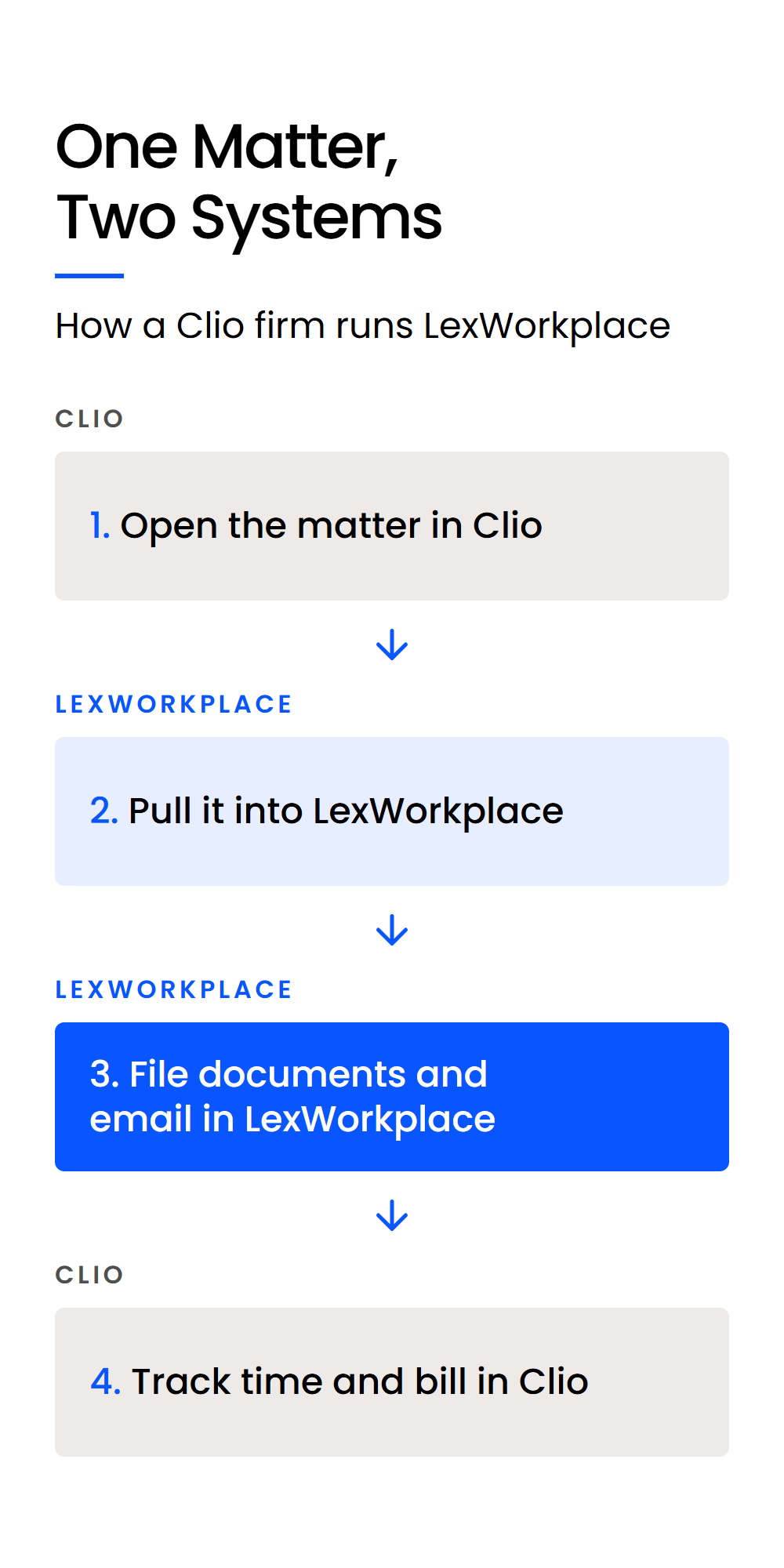
One matter moves through both systems in four steps.
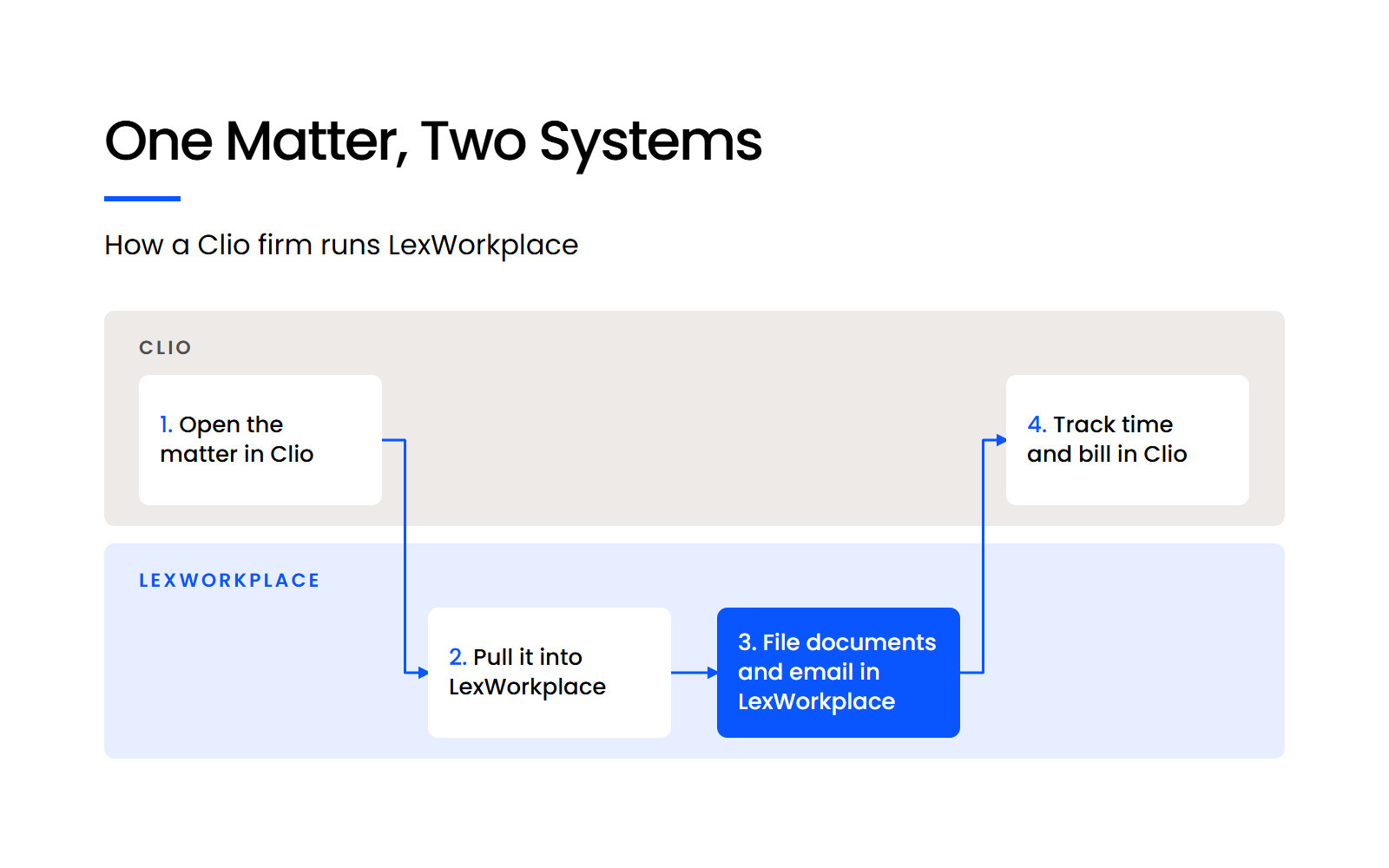
Four steps across Clio and LexWorkplace: open the matter in Clio, pull it in, file documents and email, bill in Clio

The pull works from your open Clio matters and copies each one’s details into LexWorkplace, and our guide to how LexWorkplace integrates with Clio shows what carries over.

Email needs one firm-wide decision: your firm files it in LexWorkplace or in Clio, and never in both. We’d file it in LexWorkplace, because a matter’s email then sits beside its documents and LexWorkplace’s full-text search covers email and attachments as well as documents.

How to Roll Out LexWorkplace Beside Clio

Adding LexWorkplace beside Clio works best when firm leadership explains the split before anyone logs in: what goes where, and why. Name the problems your staff will recognize, like the email nobody could find or the second copy on the shared drive.

Staff can disagree with the decision and still follow it, as long as they know the reason for it.

What Happens to the Documents Already in Clio?

In most cases they move, because a Clio firm adding LexWorkplace brings its documents out of Clio, and out of Dropbox, shared drives and other places, so each matter’s file lives in one system. Centralizing them is the point of adding a DMS, since a file split between two systems is the problem you set out to fix.

We onboard firms directly, including the migration, so your team isn’t left to move years of files alone.

A little cleanup before the move helps, as long as it stays little:

  • Decide what your firm doesn’t need to keep, such as client files past your retention period

  • Clear out the obvious clutter, like a full backup of someone’s old PC sitting in a shared folder

  • Leave long-closed matters as they are, instead of spending days reorganizing files nobody opens

A clean starting point is enough, and the archive can stay as it is.

Keep Clio and Give Every Matter’s File One Home

Clio runs the practice well, and for some firms its document tools are all they need. When email in personal inboxes and a side Dropbox start splitting the matter file, give that file one home and keep Clio for time, billing and tasks.

LexWorkplace links each matter to Clio, so your staff work in both without retyping matter details. To see how a matter looks with its documents and email in one place, start a 7-day free trial.

WHAT’S NEXT

ARTICLE
Email Management for Law Firms

FREE ASSESSMENT
Get a Free Document & Email System Audit

FREE DEMO
Get a Free Demo of LexWorkplace

Frequently Asked Questions

Yes, and plenty of firms do. It works best when every document and email for a matter lives in Clio and nobody keeps a second store for files.

Clio Drive is Clio’s virtual drive, which lets you create, open and share matter files from your Windows or Mac desktop and syncs them to Clio. It’s a desktop route into Clio’s own document storage, so the same five signs tell you whether it’s enough.

No. The integration links each LexWorkplace matter to its Clio matter and copies the matter’s details, while documents and email stay in LexWorkplace.

Core suits most Clio firms, because the Clio integration comes with every edition. Choose Advanced if you want integrated OCR, so words inside scanned PDFs turn up in search.

LexWorkplace Core is $395 a month for three users plus $50 for each extra user, and Advanced is $595 a month for three users plus $60 for each extra user (USD). That’s on top of your existing Clio subscription.

Last Updated: October 23rd, 2026 / Categories: Clio, Legal Document Management /