Table of Contents
At Uptime Legal we run a lot of software needs assessments, and they usually open with one question: are you after practice management or document management? The answer we get back is often another question: what’s the difference, and aren’t they the same thing?
They aren’t. Practice management and document management are two different categories of software, built to do two different jobs, and the overlap between them is much smaller than most firms assume.
Some of the confusion is ours to own as an industry. When a practice management vendor lists document management in its feature set, the capability behind that label is thinner than the label suggests, and firms find that out months later rather than during the demo.
Here’s what each category actually covers, where a legal document management system goes further than practice management does, and a test you can run in about ninety seconds to work out which one your firm is missing.
What a Document Management System Is For
A document management system holds everything a matter produces, documents, email and notes alike, as one connected record, and that’s a different job from the one practice management software does.
Practice management runs the practice around the matter: who the client is, what’s due, what’s billable, where the case stands. The document management system runs what the matter produces.
The two get blurred because storing a file and managing a file look identical from the outside.
What a document management system adds is everything that happens after storage: finding a document by what’s inside it, knowing which copy is current, keeping the email that explains a document next to the document itself.
That split isn’t a framing device we invented for this article. Law firm software divides into a small number of genuinely distinct categories, and document management is the one that’s been worst served.
At one end sit the legacy systems, built for a different era of practice. At the other sits basic cloud storage with a legal label on it. Very little has existed in between, which is part of why firms end up unsure which category they’re shopping in.
The useful question, then, is which of those two jobs your firm currently has nobody doing.
What a Document Management System Actually Does
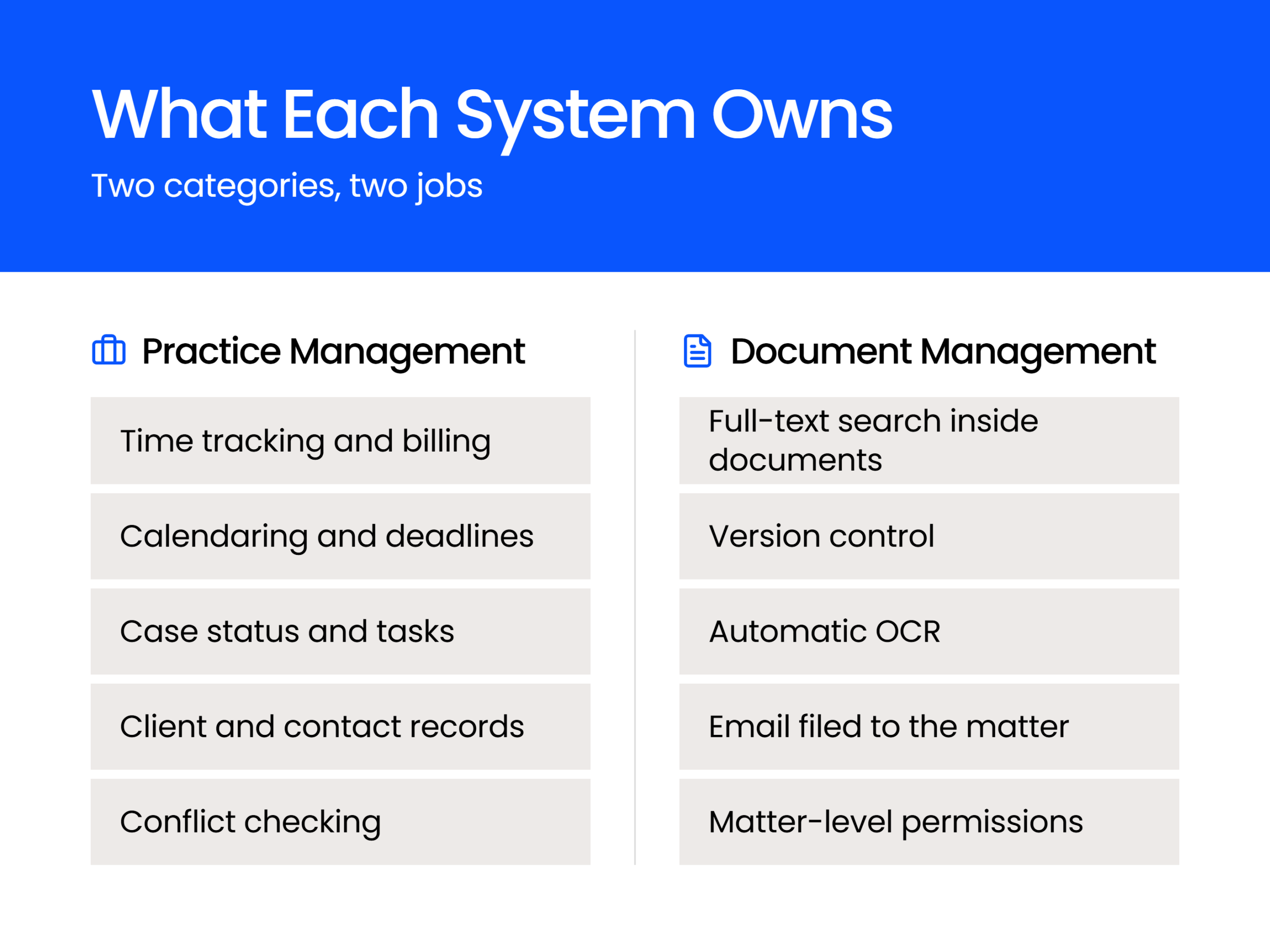
A document management system provides full-text search inside documents, automatic OCR, version control, document profiling, email management that files to the matter, and matter-level permissions.
Each of those exists because of a specific way a firm loses time or loses a document without it. Here’s what each one is for, written as the problem usually arrives rather than as a feature:
Those six are the working definition of document management. Whether a piece of software qualifies comes down to how many of them it does.
What Practice Management Software Is For
Practice management software is built to run the business side of a law practice, covering time and billing, calendaring and deadlines, contacts, and the status of each case.
That’s real work, and it’s work no document management system does. If your firm can’t tell which hours are billable or where a case stands this week, no amount of document search fixes it. Practice management is the system of record for the practice itself.
For most firms it’s also the more urgent purchase. Time that doesn’t get captured doesn’t get billed, and a missed deadline costs more than a missed document. Firms usually buy practice management first, and they’re right to.
The category has matured a great deal. Platforms like Clio put rules-based calendaring and trust accounting within reach of firms that once had no realistic option at any price.
If you’re weighing tools across every category your firm runs, our rundown of law firm software by category covers the rest of the stack.
What Practice Management Software Covers
A practice management platform typically covers contacts, cases, calendaring, time tracking, billing, document assembly, accounting, and basic document storage or linking. The exact mix varies from one application to another, and most land on this set:
Those, in general, are the features of a practice management application, and what makes practice management software practice management software.
Why “Document Management” on a Feature List Usually Isn’t
Most practice management platforms let you link or attach a document to a matter, and the tools they wrap around it are thinner than the phrase “document management” suggests.
Notice that last bullet, the one with the asterisk. I flagged it that way on purpose, because most practice management applications can interact with your documents in a number of limited ways.
Some on-premises practice management applications can link to documents you’ve stored elsewhere.
If your firm runs on-premises practice management software and also has an on-premise file server, and your firm stores matter-related documents in the S: (network) drive, your practice management software may let you link a specific document in S:\Matters\Smith\Matter\Motion.docx to the Smith Matter inside the software. (Effectively, a shortcut.)
Some cloud-based practice management applications let you upload and attach documents to a particular matter, the way you’d attach a file to an email. You attach Motion.docx to the Smith Matter in your cloud-based practice management software, and that’s about it.
It’s good for simple filing. The better platforms have closed part of this gap since this article first ran: Clio’s document management now searches the text inside documents, keeps a version history, and supports custom tagging.
Where it stops is worth knowing precisely. Clio’s own documentation says OCR isn’t supported by its full-text search, so a scanned PDF stays unsearchable no matter how good the search is.
You can’t roll a document back to an earlier version in place, and the documented workaround is to download the old one and re-upload it.
Documents in connected third-party storage fall outside that search entirely, and the deeper versioning, major and minor with file locking, is limited to select Clio plans. What you get is closer to a well-organized Google Drive built into your practice management software.
Now, for some firms, this document linking or attaching is all a law firm needs, particularly solo and small law firms. And if that’s you, that’s fine.
But here’s the problem.
When many practice management software companies describe a list of their software’s features, things like time and billing, calendaring and so forth, they get to the document linking or attaching capability and they don’t call it that.
What do they call it?
You guessed it. They call it document management.
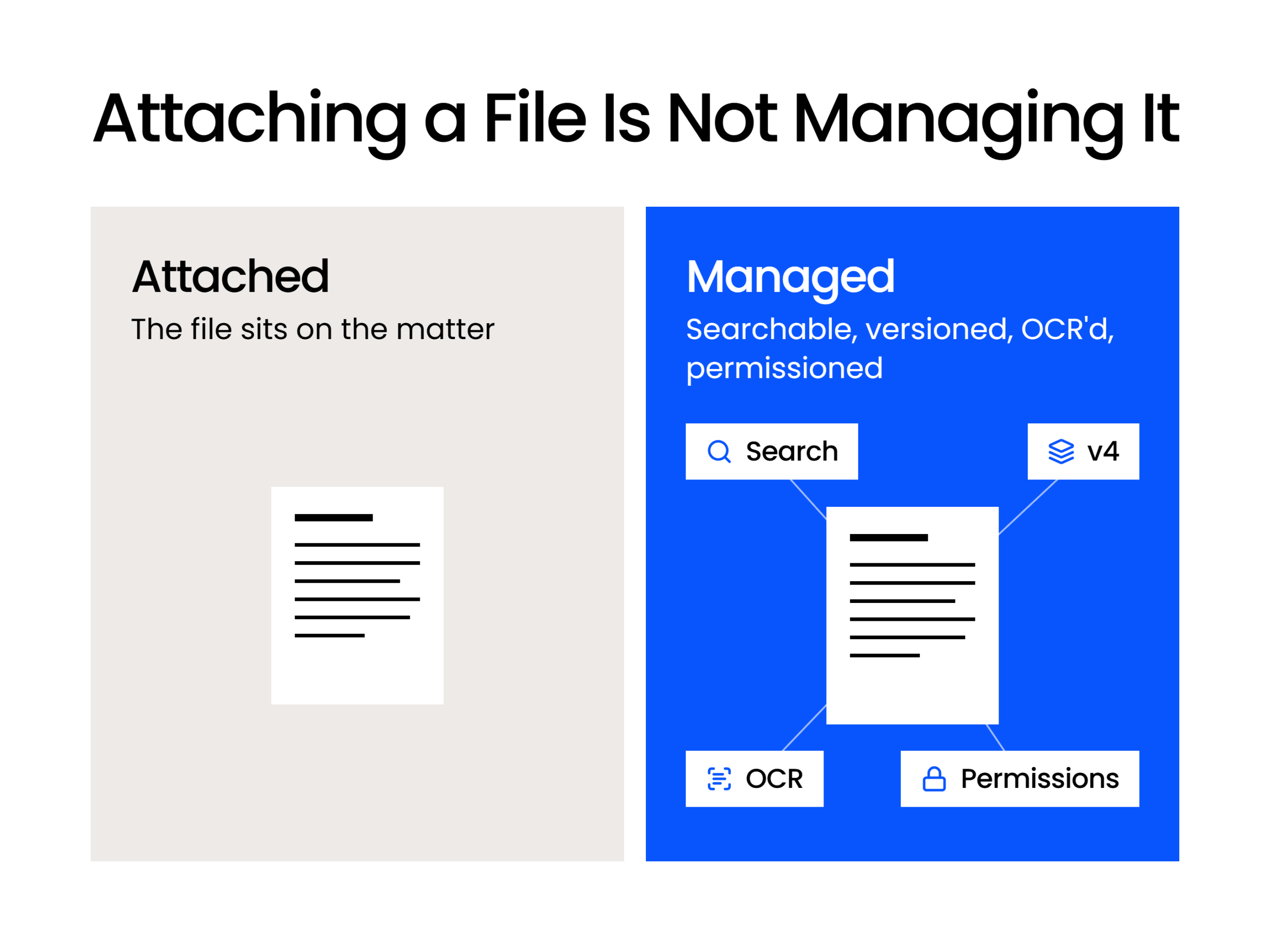
Which, based on the six capabilities above, it most certainly is not. Linking or simply attaching a document is not document management.
The problem becomes this: when someone at a law firm who isn’t up to speed on all the semantics sees “Document Management” listed as a feature of a particular practice management application, they may think, “Great, document management is built in.”
And they assume, based on that label, that the application comes with the entire set of capabilities described earlier: search, version management, OCR, tagging, profiling and email filed to the matter. It comes with some of them, at a shallower depth, and the ones it leaves out are the ones a document-heavy firm hits first.
And that’s where all the bodies are buried.
Which One Is Your Firm Actually Missing?
If you can pull every document and every email on a two-year-old matter from one place, you probably have what you need; if it takes three or four places, you’re missing a document management system.
That’s the whole test, and it’s the one I run with firms before I look at a single feature list.
What the test reveals is where the matter’s record lives, and the answer is almost never one place. The documents come off the shared drive, and the email comes out of Outlook, usually one person’s Outlook.
Somebody then calls a paralegal to find out which version got signed, and someone admits the good copy has been sitting on a desktop for months.
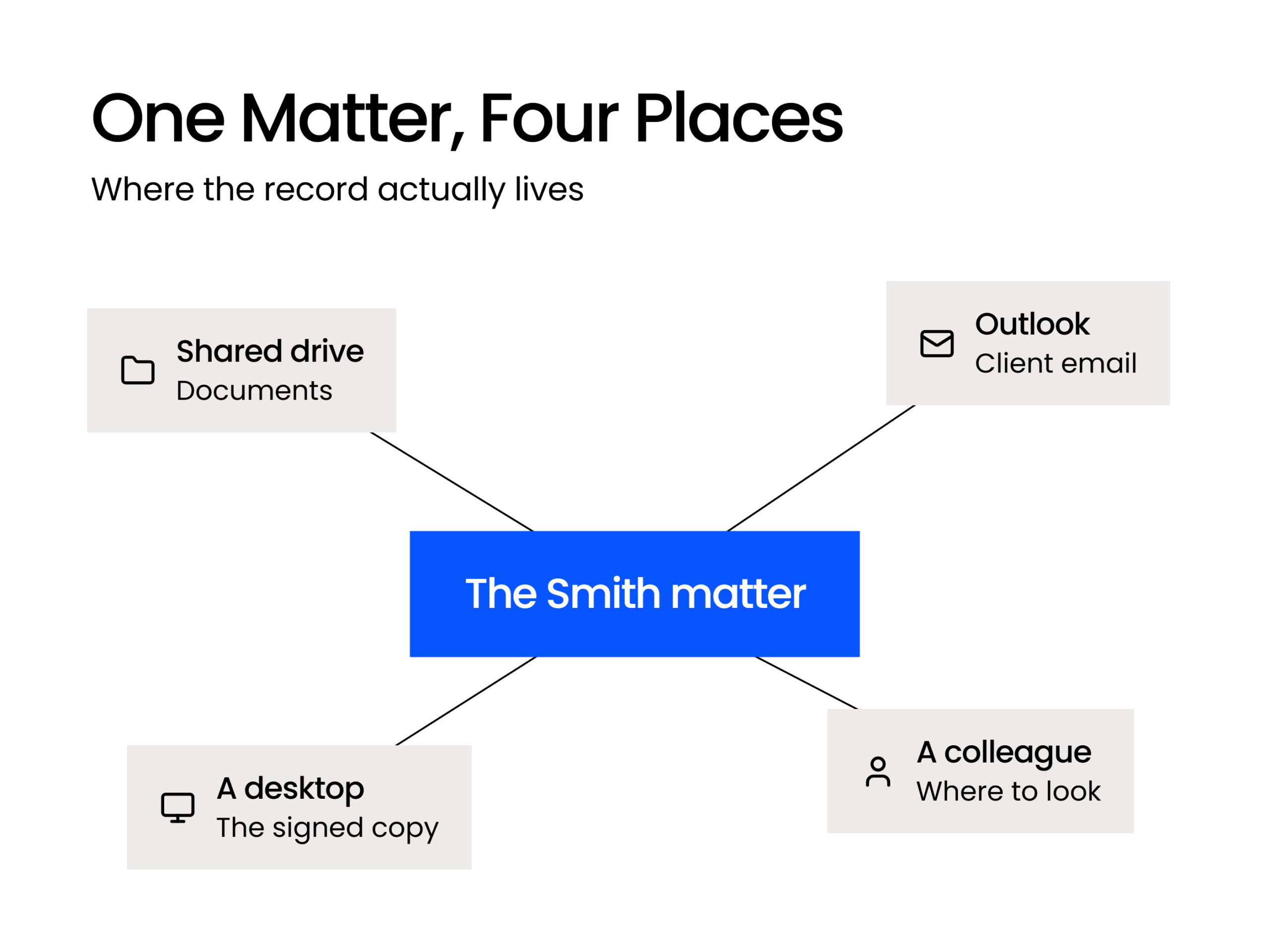
A firm that visits three places to reconstruct one matter needs a document management system, whether or not it already runs practice management. The practice management software is doing its job. The matter’s content is living somewhere nothing manages it.
Five quick checks confirm the result, and each one names the capability your firm is missing:
That last row is the one worth sitting with. If the honest answer to how your firm finds things is that you ask one particular colleague, your firm doesn’t have a filing system; it has a colleague, and that arrangement leaves when they do.
One caveat, and it’s a real one. A true solo, or a tidy two-person shop with low matter volume, can get by without a dedicated document management system for a while.
If you know where everything is because there isn’t much of it, buying a system to manage it is premature. The test still works, and it comes back clean.

Do You Need Both?
Most growing firms run both, with practice management handling time, billing and deadlines while the document management system handles documents, email, versions and search.
That’s less redundant than it sounds. The two aren’t competing for the same job, which is why firms running both rarely describe it as running two overlapping systems.
You open practice management to see what’s due and what’s billable. You open the document management system to work on the file.
Day to day, the split holds cleanly:
Each is the system of record for its half, and neither tries to be the system of record for the other.
Integration is where the two meet, and it’s worth being precise about what LexWorkplace’s Clio integration does. A good integration keeps your matters in sync, so nobody creates the same matter twice and corrects the name in two places later. LexWorkplace’s Clio Manage integration works this way.
What integration doesn’t do is merge two products into one. You’ll still have two logins, and your documents don’t become searchable inside your practice management software because the two systems talk to each other.
If a vendor tells you an integration removes the need for one of the systems, ask which capabilities move across, specifically, and check the answer against the six above.
Two systems, two logins, considerably less going missing. For most firms past a handful of people, that’s a trade worth making.
Two Systems, Two Jobs
So: two categories of software, two jobs, and one label doing work it hasn’t earned. Practice management runs your practice. A document management system runs your documents and the email that goes with them.
Your firm may need one. It may need both. What it doesn’t need is to find that out on a deadline, while somebody hunts for a scanned exhibit nobody ever made searchable.
If you want a straight answer, run the test. Pick a matter from two years ago and try to put its record back together. However many places you end up visiting, that’s your answer.
WHAT’S NEXT
Frequently Asked Questions
These are the questions firms ask us most often once they’ve worked out that the two categories are separate.