
Why Email and Document Management Should Be Integrated for Law Firms

Law firms should manage emails and documents together by matter. Email is part of the file, not something that should stay scattered across Outlook, personal folders, or individual inboxes. When matter-related communication lives separately from the rest of the record, the file gets weaker, and the team has a harder time finding the full story.
That’s a real problem in legal work because email often carries instructions, approvals, negotiation points, deadline changes, and comments that shape the documents in the file. If that communication is stored somewhere else, attorneys and staff end up working from fragments instead of one complete matter record.
This article explains why integrated email and document management matters for law firms, what goes wrong when those systems stay separate, and what a better matter-centric setup looks like in practice.
In This Article
Email Is Part of the Matter, Not Separate From It
As Dennis Dimka, Founder and CEO of Uptime Legal, put it, “An email is essentially a document and an email is really part of the matter. It’s not separate from it.” That’s exactly why law firms run into trouble when matter-related communication stays in Outlook while the rest of the file lives somewhere else. Uptime Legal’s team page and Dennis’s bio both identify him as Founder and CEO.
An email can carry client instructions, approvals, negotiation points, deadline changes, and comments that shape the work product in the file. When that communication stays separate, the matter record gets split.
In a lot of firms, that split feels normal. The document is saved to the file. The email stays in an inbox, a personal folder, or a shared mailbox. Later, someone needs to understand what happened and ends up hunting through multiple places to piece the story back together.
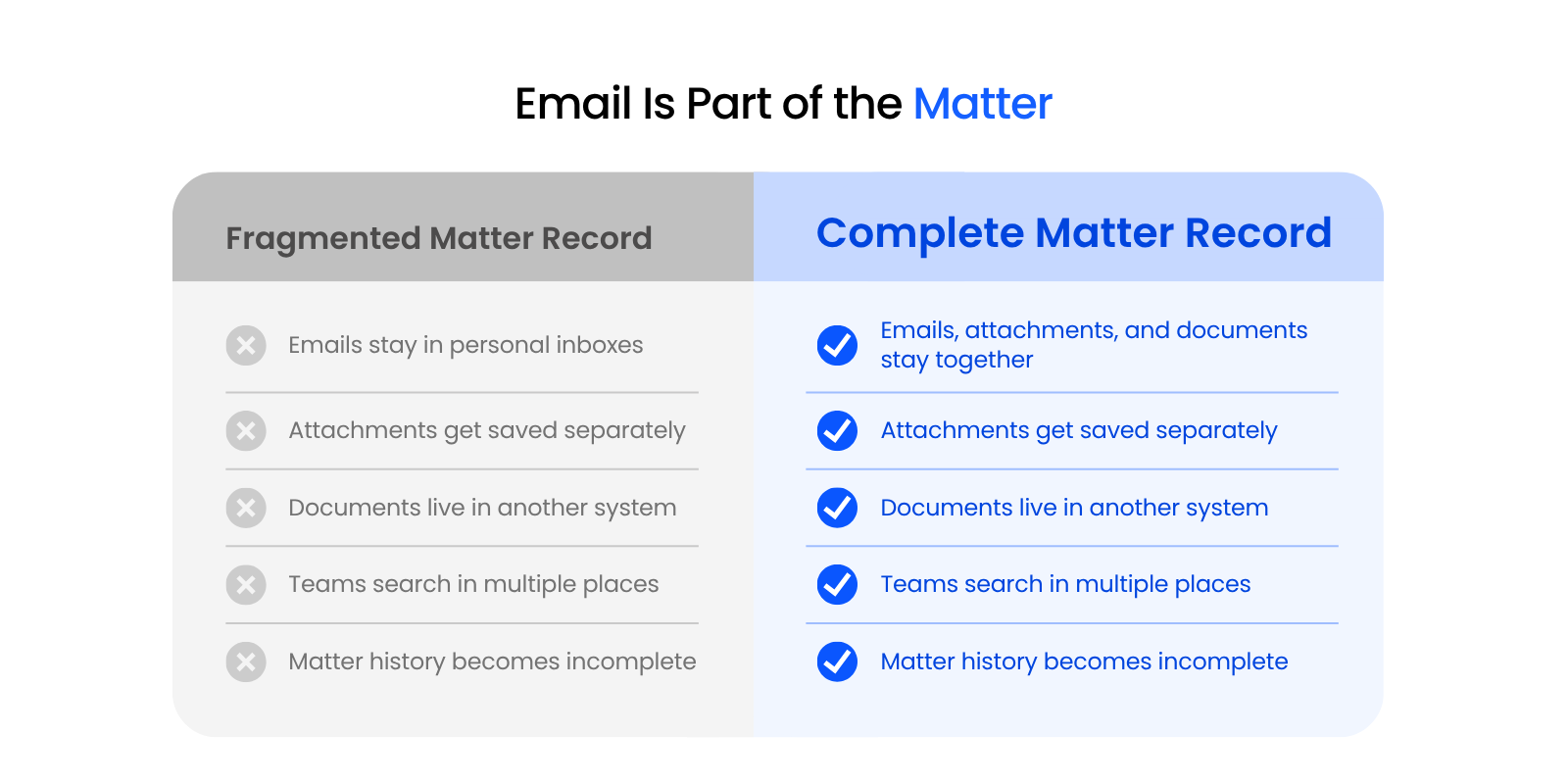
That’s where the problem starts.
- A draft may be stored correctly, while the email explaining what changed is buried in one person’s inbox.
- An attachment may make it into the file, while the message approving it or questioning it never does.
- A team member may find the final version of a document, but still miss the context that shaped it.
For law firms, matter context includes the communication around the work. The file is more useful when it reflects both the work product and the decisions, clarifications, and conversations tied to it. Without that context, the record is thinner than it looks.
Keeping emails, attachments, and documents together by matter gives the team a more complete view of what happened and why. It makes the file easier to search, easier to share, and easier to rely on when more than one person needs to work from it.
That’s the real point of integration. It helps law firms work from a fuller matter record instead of scattered fragments.
- Capture matter-related email without making the workflow clumsy
- Keep the matter, not the individual inbox, at the center of organization
- Support search across the full record
- Give the firm a stronger foundation for access, consistency, and retention

Related – Email Management for Law Firms: Proper document and email management can mean the difference between a good law firm and a great one.
What Goes Wrong When Emails and Documents Live in Separate Systems
When emails and documents live in different systems, the problem usually shows up piece by piece. A lawyer finds the final draft, but not the email that explains why it changed. A staff member finds the attachment, but not the approval that came with it. Someone remembers a key detail, but has to dig through Outlook, a shared mailbox, and the matter file to reconstruct what happened.
That kind of setup weakens the matter record in several different ways. It breaks the file apart, slows retrieval, makes collaboration depend too heavily on individual habits, and creates governance problems later.
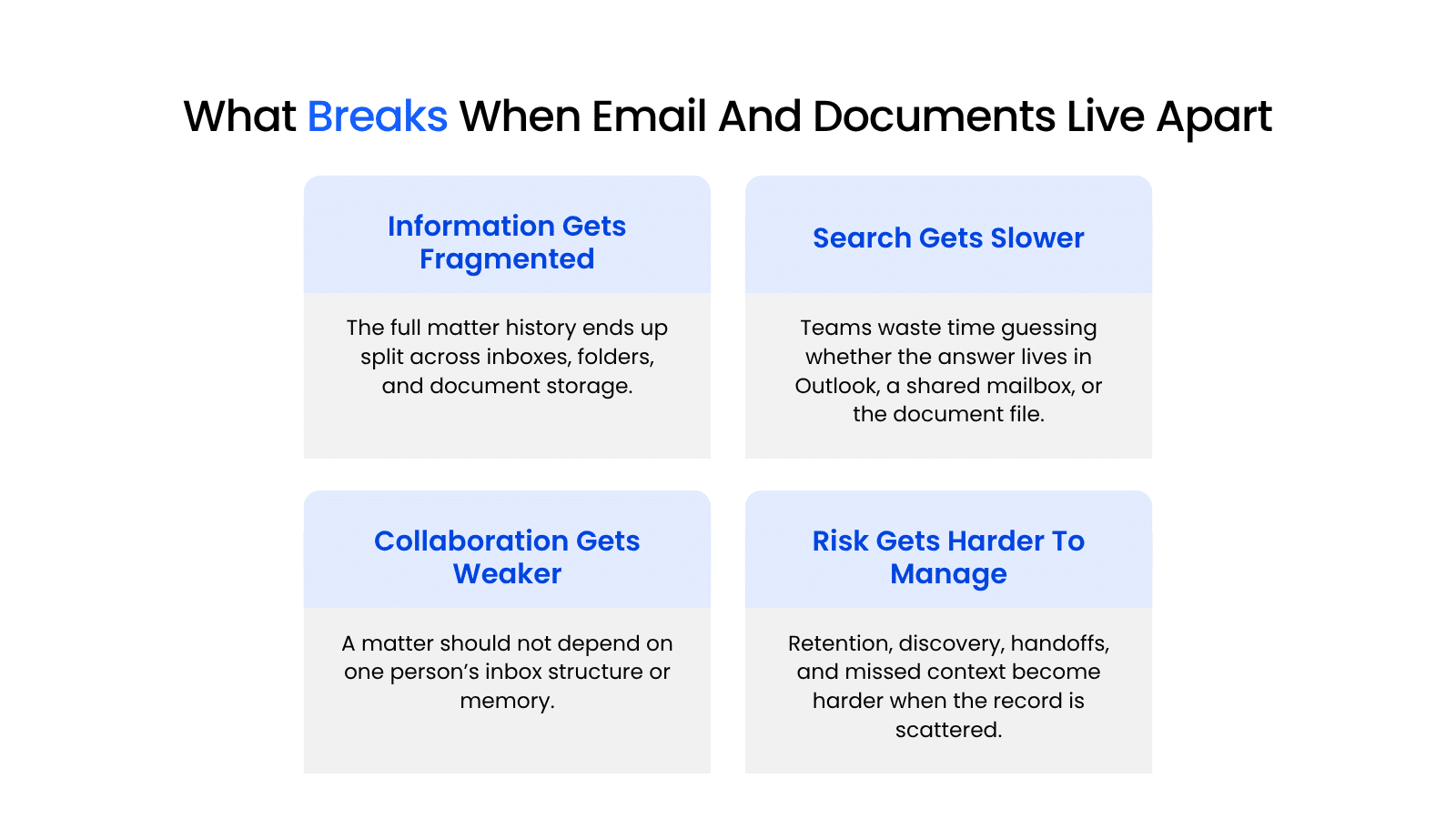
Information Gets Fragmented
The first problem is structural: the record itself breaks apart.
A law firm matter rarely lives inside one finished document. It usually includes emails, attachments, comments, approvals, and the back-and-forth that explains why certain decisions were made. When those pieces are stored in different places, the matter stops functioning like one coherent file.
That matters because the firm may technically have the information, but not in a form that holds together. The document is here. The email is somewhere else. The attachment lives in a third place. Instead of one reliable matter record, the team is left with pieces.
Search Gets Slower And Less Reliable
Once the record is split, retrieval gets harder.
A user trying to answer one question may have to search Outlook, a shared mailbox, a document folder, and a few downloaded files before finding the right item. Even when each system has its own search function, the work still slows down because people have to guess where to look first.
This is where separate systems start creating daily friction. The team may remember that the answer exists, but still lose time figuring out whether it lives in the email body, the attachment, or the saved document. That is not just a storage issue. It is a retrieval problem.
Collaboration Depends On Individual Inbox Habits
Separate systems also make the matter too dependent on individual habits.
When matter-related communication stays in personal inboxes or user-specific folder systems, the record becomes harder for the rest of the team to work with. Visibility depends on who filed what, who remembered to save something, and who uses a folder structure other people can actually follow.
That may feel manageable when the same person stays close to the matter from start to finish. It starts to break down during handoffs, coverage, staff changes, or even a simple day out of the office. The more the system depends on personal behavior, the less dependable the shared record becomes.
Risk Increases Around Retention, Discovery, And Missed Context
The last problem is downstream: governance gets harder when the record is scattered.
When emails are stored separately from the rest of the matter, it becomes more difficult to apply retention practices consistently, preserve the full record when needed, and feel confident that the file reflects what actually happened.
- Discovery becomes harder when key communications are buried in inboxes.
- Retention becomes harder when matter-related content is spread across too many places.
- Oversight becomes harder when the firm cannot easily tell what has and has not been captured.
A fragmented system can leave the firm with a record that is harder to manage, harder to defend, and harder to trust later.
When emails sit in one place and documents in another, the file suffers in predictable ways. The record gets broken up, retrieval gets slower, collaboration becomes more person-dependent, and governance becomes more difficult than it needs to be.
Free Law Firm Document System Self-Audit
See where your firm’s documents, emails, permissions, and workflows may be creating risk or slowing your team down.
Why Integration Works Better for Law Firms
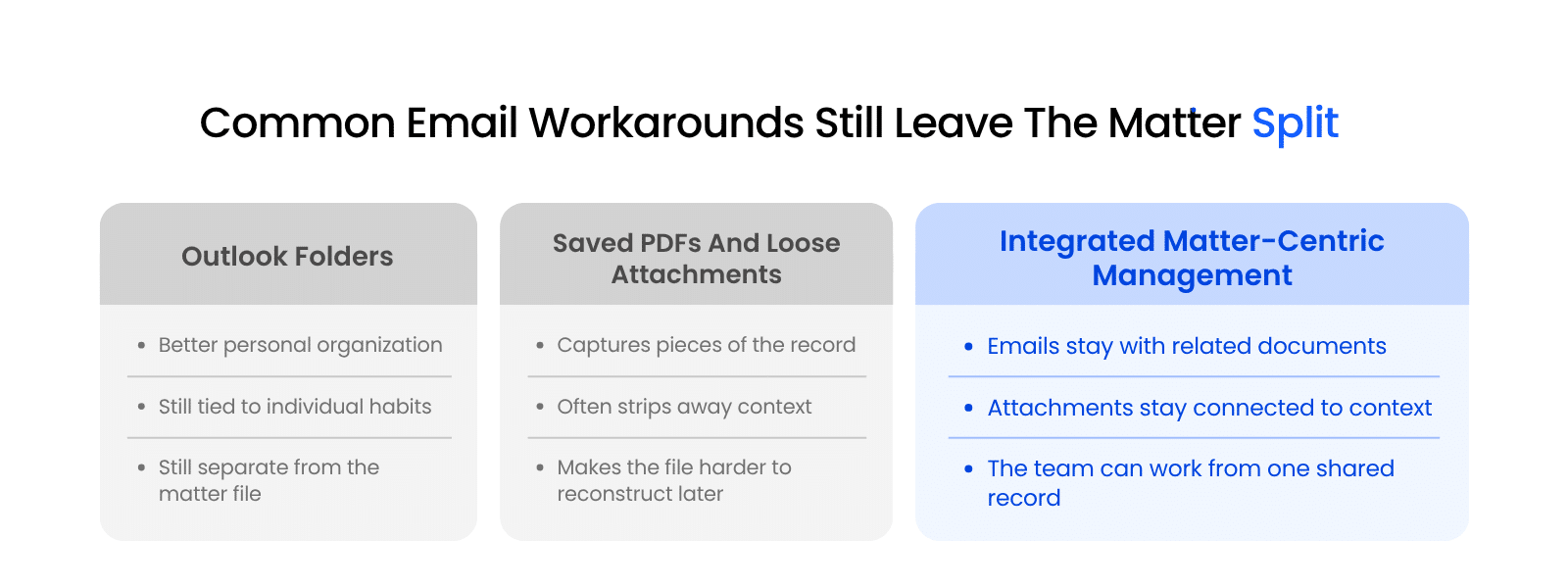
Integrated email and document management works better because it gives the firm one usable matter record instead of several partial ones. The point is not just to keep things tidier. It is to make the matter easier to follow, easier to work on, and easier to trust when more than one person needs the full story.
One Matter File, One Source Of Truth
A matter-centric system, with one source of truth means the team knows where to go when a matter question comes up.
Say a partner asks, “Did the client approve this language?” If the file is split, someone may have to check the document folder for the draft, Outlook for the approval email, and a saved attachment to see which version was actually sent. That takes time, and it leaves room for missed context.
In a matter-centric system, that search starts in one place: the matter itself. The draft, the approval email, and the related attachment all live in the same record. The question gets answered faster because the team is not reconstructing the file from separate systems.
That kind of setup also helps when work changes hands. If a paralegal needs to pick up the matter, or another attorney has to step in before a deadline, the record is easier to follow because the history of the work is already tied together.
Emails And Attachments Stay Connected To The Rest Of The File
A document is often easier to understand when the related communication stays with it.
For example, a revised contract may be saved correctly to the matter, but the client’s email may explain which clause changed, what they agreed to, and what still needs follow-up. If that email stays in one person’s inbox, the team has the document, but not the full context around it.
When the email, the attachment, and the matter documents stay connected, the file becomes more useful later. Someone reviewing the matter can see not only what was sent, but also why it mattered.
Teams Can Search Across Communications And Documents Together
Integration also improves how the team retrieves information.
Instead of treating email search and document search as separate activities, the firm can search across the matter record more directly. That matters when someone remembers a fact, but not where it lives. They may know the client commented on a draft or approved a deadline change, but not whether that information sits in the email body, the attachment, or the final document.
A stronger system reduces that guesswork. The team spends less time deciding where to search and more time working with the answer once they find it.
Governance Becomes More Consistent
This also becomes more concrete in everyday firm operations than the word governance sometimes suggests.
For example, when matter-related emails are left in personal inboxes, each person ends up making their own decisions about what gets saved, what gets left behind, and how the record is organized. One attorney may save both the email and attachment. Another may save only the attachment. Someone else may leave everything in Outlook. The result is a file that reflects personal habits more than firm standards.
A shared, matter-centric system gives the firm a better chance to apply the same structure across matters. It becomes easier to:
- Keep related emails with the rest of the file
- Make matter content visible to the right people
- Support more consistent retention and preservation practices
- Reduce the risk that key communications stay buried in one user’s mailbox
That does not solve every policy issue on its own. It does give the firm a stronger operational foundation, which is usually where consistency breaks down first.
When legal work is organized this way, the payoff is straightforward: the matter is easier to follow, easier to search, and easier for the team to work with as a shared record. That is why integration works better in practice.
Why Outlook Folders and Workarounds Are Not Real Integration
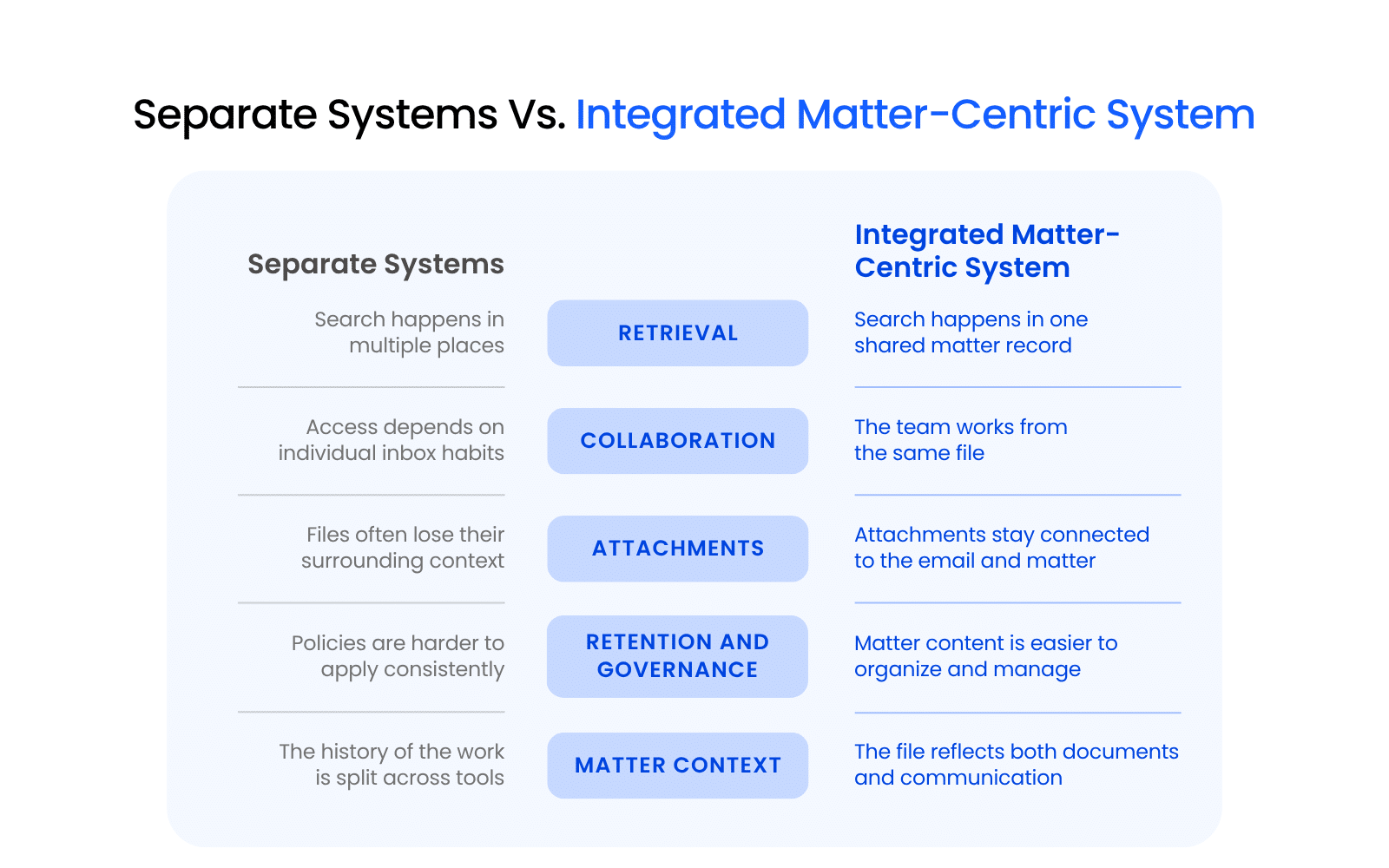
A lot of law firms already have an email “system.” It just happens to be built out of personal Outlook folders, shared mailboxes, saved PDFs, downloaded attachments, and a few habits people hope everyone else follows. That can create some short-term order. It does not create a complete matter record.
Outlook folders help individuals manage communication, but they do not turn Outlook into a shared matter record. Outlook is a communication tool. It works well for sending, receiving, and organizing email at the user level. What it does not do well on its own is function as the place where the full matter history lives for the team. A lawyer may know exactly where a thread sits in their mailbox, but that does not mean the rest of the team can find it, understand its context, or work from it easily later.
Shared mailboxes improve visibility, but they still leave the matter divided. They may give more people access to the same messages, which is better than relying on one person’s inbox. The problem is that the email still sits apart from the rest of the matter content. The team is still working across separate environments instead of one shared record.
Saving emails as PDFs only captures part of the picture. In some cases, a PDF copy may be useful. It can also flatten the communication into something less usable. Metadata may be harder to work with. Threads may lose clarity. The connection between the email, the attachment, and the rest of the file often gets weaker.
Saving attachments separately creates loose records. A document may make it into the matter folder, while the message that explains why it was sent, what changed, or what still needs approval disappears into someone’s inbox. The file may contain the artifact without the context.
Forwarding emails around is a workaround, not a filing strategy. It depends on people remembering to do it, doing it consistently, and sending it to the right place every time. That kind of process usually breaks down the moment the team gets busy, someone new joins the matter, or different people follow different habits.
This is why these approaches tend to feel better than they actually are. They can reduce some immediate mess, but they still leave emails in one place and matter documents in another. For law firms, that gap matters. The file is stronger when the communication around the work stays with the work itself.
The more useful question is not whether a workaround helps a little. It’s whether it gives the firm a shared, matter-centric record that holds up over time. Outlook folders, ad hoc PDFs, and loose attachments usually do not.
What to Look for in an Integrated Email and Document Management System
Once a firm accepts that email belongs with the matter, the next question becomes practical: what should the system actually help the firm do? The answer is not a bloated list of features.
The better lens is whether the system helps the firm keep emails, attachments, and documents together in a way that is easier to capture, find, share, and manage over time.
A strong document management system should make it easier for the firm to do four things well:
Outlook should still fit into that workflow, but it should not be the final destination.
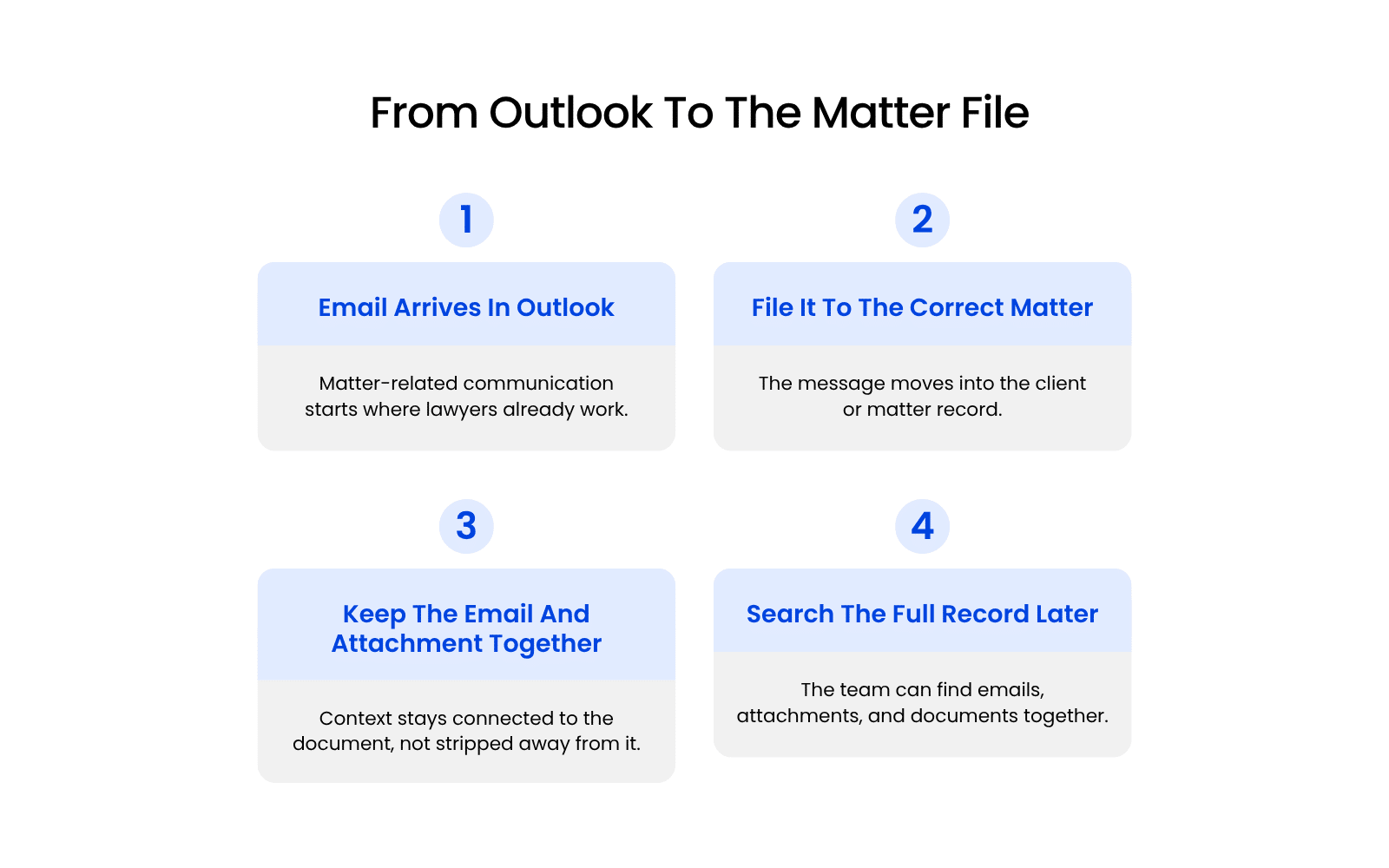
Outlook-Based Filing Or Capture
“Easy Outlook capture” should mean more than a vendor saying the system integrates with Outlook.
In practice, the firm should be able to answer questions like these:
- Can a user file an email to the right client or matter without leaving the normal workflow for too long?
- Can they file the email and attachment together when both matter?
- Can the system help reduce manual guessing about where the email belongs?
- Will lawyers actually use it when they are busy, or does it add too many steps?
That last question matters most. If capturing matter-related email takes too much effort, people will fall back to leaving it in Outlook. A workable system should make filing feel like part of the job, not a separate administrative project.
Matter-Centric Organization
“Matter-centric” should mean the system organizes information around the matter itself, not around whoever happened to receive the email.
A strong test is whether the system helps prevent problems like these:
- A key email lives in one lawyer’s inbox, while the related document lives somewhere else
- A team member can find the attachment, but not the message that explains it
- Different users organize the same matter in different ways
- A handoff becomes harder because the record depends on personal folder habits
If the system still allows the matter to break apart across inboxes, user folders, and loose files, it is not solving the core problem. Matter-centric organization should keep related emails, attachments, and documents tied to one shared record.
Search Across Email Bodies, Attachments, And Documents
Search should work across the content that actually makes up the file.
That means the system should help the team retrieve:
- Information in the email body
- Content inside the attachment
- Related documents stored in the matter
- The surrounding context needed to understand what was approved, sent, revised, or discussed
A simple way to judge this is to imagine a real question: Can someone find the client’s approval, the attached draft, and the final saved version without searching three separate places?
If the answer is no, the search experience is still fragmented.
Good search is not just a convenience feature. It determines whether the firm can retrieve the full story without wasting time guessing where the answer lives.
Security, Permissions, And Retention Support
This should also be judged by what the system helps the firm avoid.
A stronger system should help reduce the risk that:
- Matter-related emails stay buried in one user’s mailbox
- Team access depends on who happens to have a thread in Outlook
- Similar matters end up with inconsistent filing practices
- Important communications are harder to preserve because they were never captured into the record
- Retention decisions are made informally at the inbox level instead of from a more complete matter file
The point is not that the software solves every policy issue by itself. The point is that it should give the firm a better operating foundation. Permissions should support the right level of access. Retention support should make it easier to manage matter-related communication as part of the record, not as scattered leftovers across personal mailboxes.
When evaluating a system, that is the real standard: does it help the firm keep matter-related communication where it belongs, and does it make that easier to do consistently in real life? If it does, the system is probably supporting the right model. If it does not, the firm is still relying on workarounds with a nicer label.
LexWorkplace Free Trial
The free trial is finally here!
This highly-anticipated opportunity has now been fully implemented for users to learn the value of LexWorkplace.
Use this trial to:
- Upload Files
- Create Matters
- Organize Documents
- Integrate Emails
- Share and Collaborate
Ready to Try the Last DMS You’ll Ever Want?
Integrated Systems Help Law Firms Work With Full Context
When a law firm keeps emails, attachments, and documents together by matter, the file becomes a more reliable record of the work. People can see not just what was created, but what changed, what was approved, and what shaped the next step.
That fuller context matters in everyday legal work. It helps with:
- Handoffs between attorneys and staff
- Follow-up work when someone needs the history quickly
- Client questions that depend on more than the final document
- Internal collaboration when multiple people need the same record
This is why integrated email and document management is more than a workflow preference. It affects how well the firm can retrieve information, preserve context, and work from the same record over time.
For firms trying to improve that, LexWorkplace is built to keep emails, attachments, and documents together by matter, so the record is easier to search, easier to share, and easier for the whole team to use.
If the goal is a more complete matter file, integration is part of getting the file right.
Related – Best Legal Document Management Software for 2026 | Buyer’s Guide: Compare what law firms should look for in a DMS.
Frequently Asked Questions
The strongest approach is to treat matter-related email as part of the matter file, not as something that stays trapped in individual inboxes. That means saving relevant emails to the correct matter, keeping useful attachments with the rest of the record, and making that information accessible to the wider team.
Yes, when the email helps document the work, preserve context, or support the record. That often includes client instructions, approvals, negotiation points, deadline changes, and comments that affect the matter.
No. Outlook works well for sending, receiving, and reading email, but it was not built to serve as the firm’s shared matter record. A lawyer may know where something sits in Outlook, while the rest of the team still struggles to find it or understand how it connects to the rest of the file.
Often, yes. In many situations, the attachment alone does not tell the full story because the email explains why it was sent, what changed, what was approved, or what needs to happen next.
The most effective model is matter-centric organization. Emails, attachments, and documents should be stored by client or matter so the team can work from one shared record instead of piecing the history together from inboxes, folders, and separate storage tools.
The record gets fragmented. Search becomes slower, collaboration depends too much on individual inbox habits, and the team is more likely to miss the context around a document, revision, or client instruction.
Yes. When emails, attachments, and documents are kept together, users are less likely to waste time guessing where the answer lives. Integrated systems make retrieval more direct and give the team a better chance of finding the full story instead of only part of it.
It applies to both. The issue is not firm size. The issue is whether the firm wants a complete, searchable, and shared matter record instead of a process that depends on personal inbox habits.
Look for a system that supports Outlook-based capture, matter-centric organization, search across email bodies, attachments, and documents, and stronger support for permissions, consistency, and retention. Those are the signs that the system is helping the firm manage the full record instead of just organizing one more inbox.
Looking for Document Management Software?
LexWorkplace:
Modern Document Management for Law Firms
LexWorkplace is document & email management software, born in the cloud and built for law firms. Here’s a quick primer on how it works, or get your free trial to discover LexWorkplace for yourself.
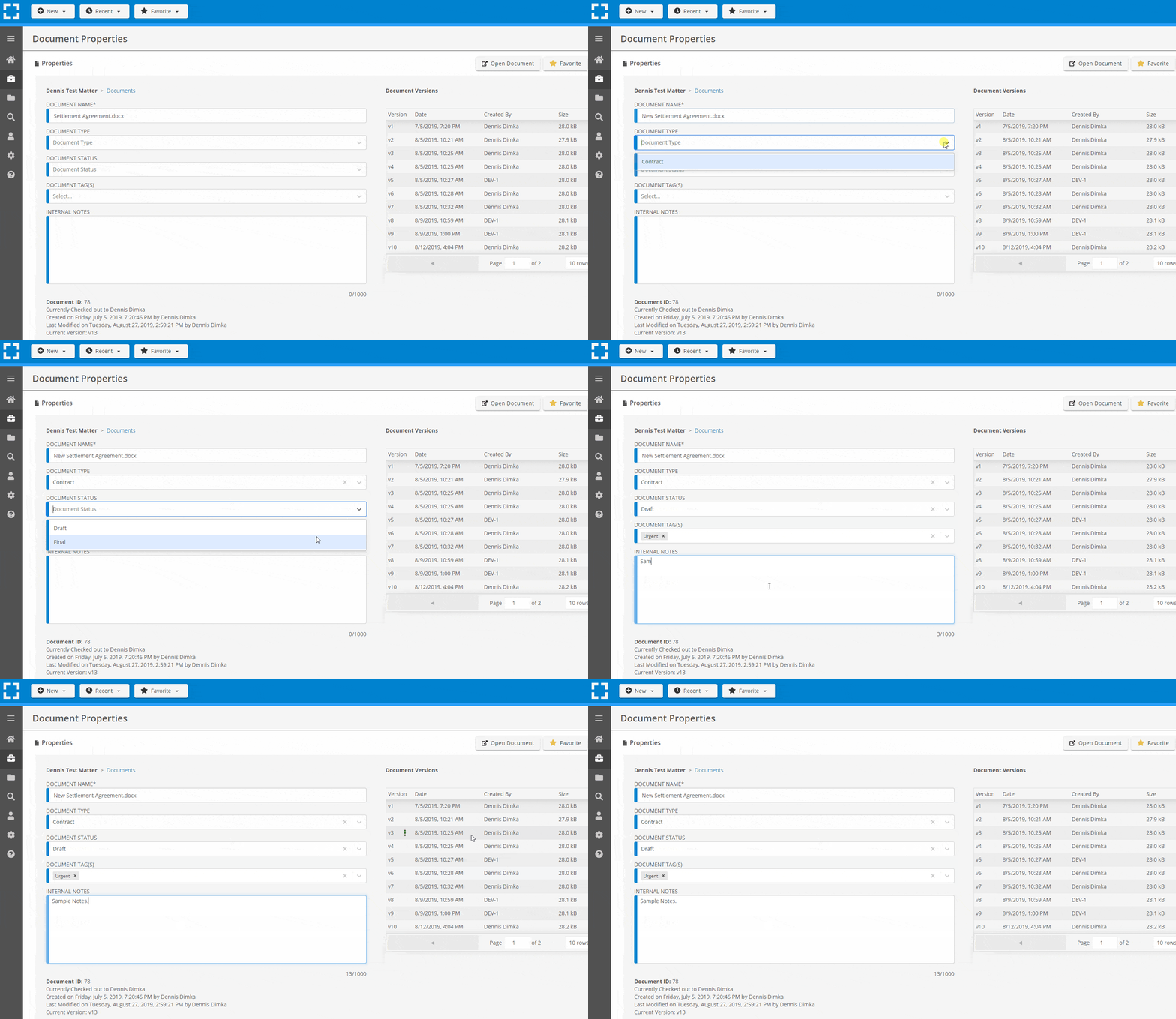
Organize by Client & Matter
Organize documents, email and notes by client or matter. Store and manage all data for a case or project in one place.
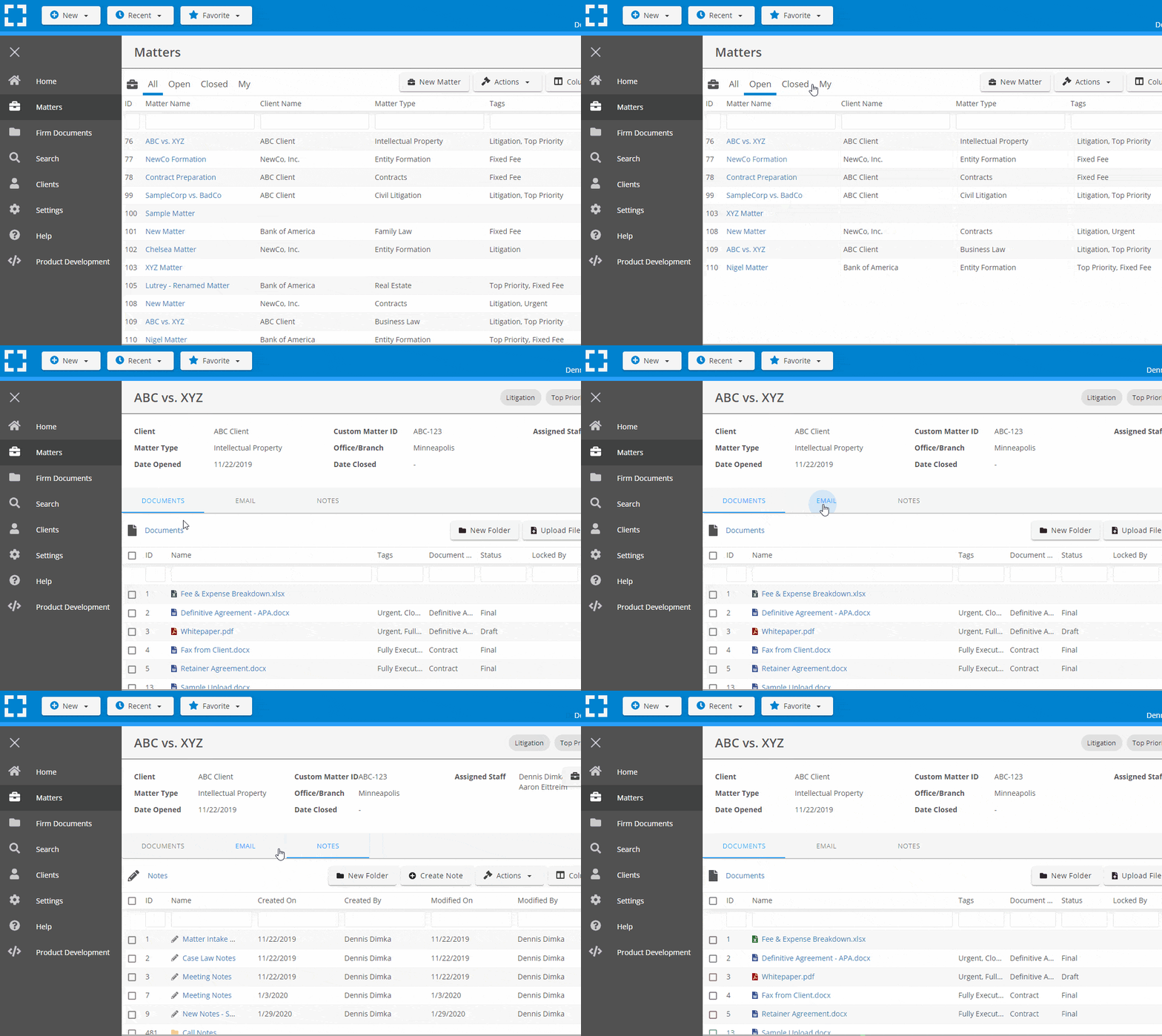
Go Beyond Basic Files & Folders
Supercharge your firm’s productivity with true DMS functions.
- Version Management
- Document Tagging & Profiling
- Document Check-Out / Check-In
- Microsoft Office Integration
- Automatic, Integrated OCR
- Convert Word Docs to PDF
Search Everything
LexWorkplace is like Google for your law firm. Search across millions of pages, documents, folder email and notes in seconds. Refine your search by matter, document type, author and more.
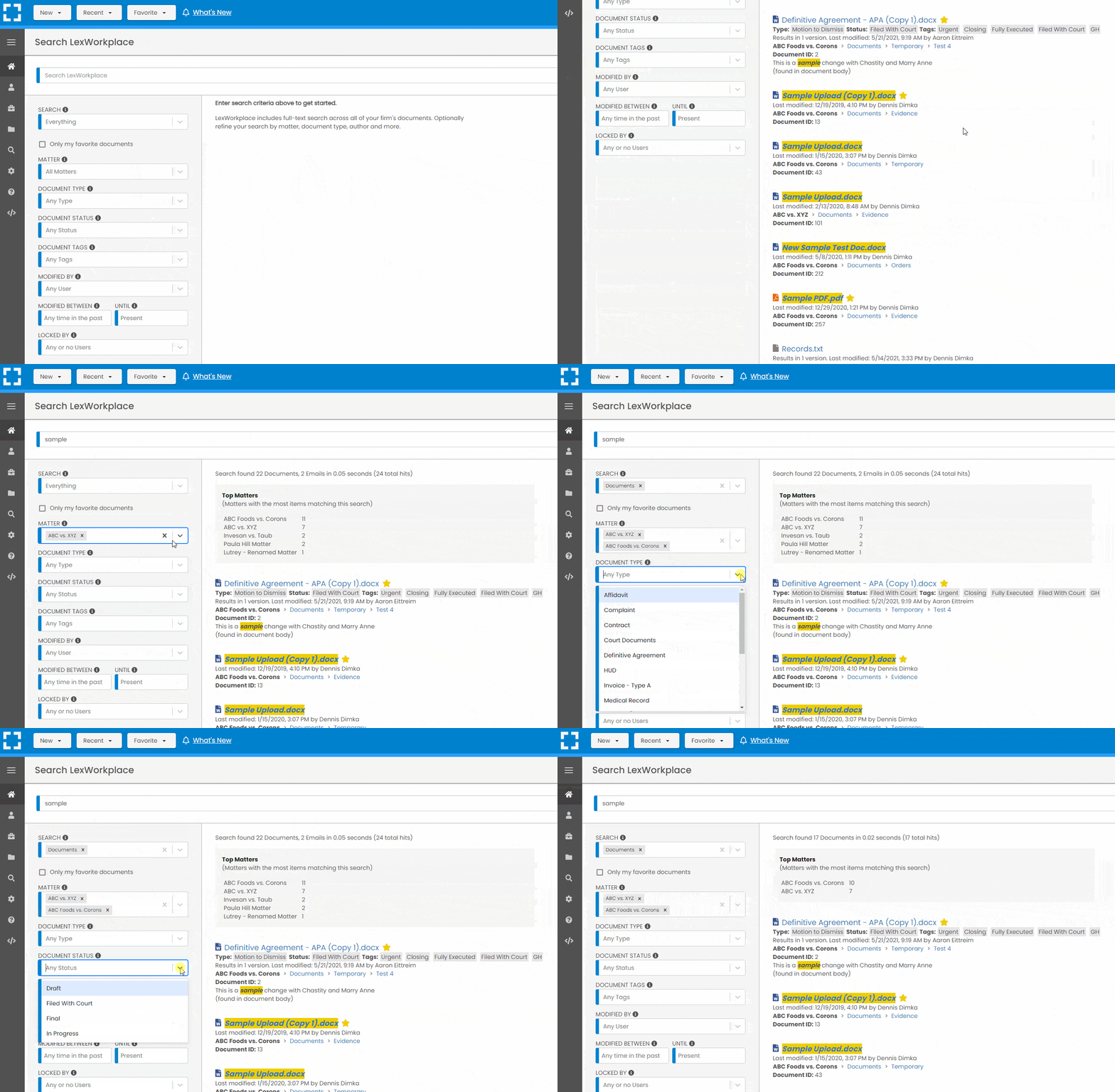
Search by…
- Client or Matter
- Document Type (Contract, Complaint, Order, etc.)
- Document Status (Draft, Final, etc.)
- Document Tags (Filed With Court, Fully Executed, etc.)
Outlook Integration + Comprehensive Email Management
Save emails to a matter without leaving Outlook. Saved emails are accessible to your entire team, organized and searchable.
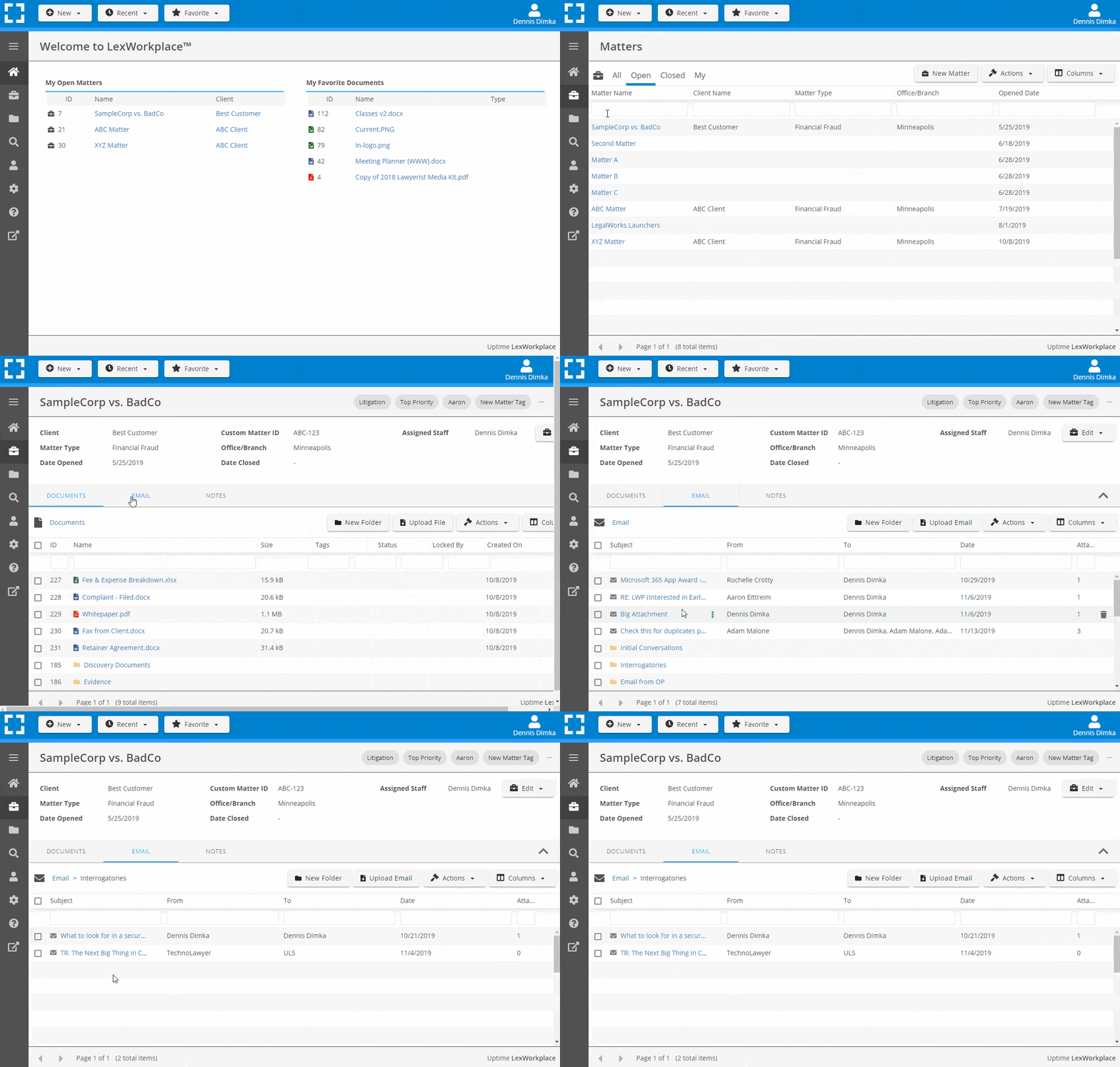
- Outlook Add-In that Works With Windows and Macs
- Save Entire, Original Email to a Matter in a LexWorkplace
- Email De-Duplication
- Organize Emails into Folders, Subfolders
Works with Windows and Macs
All of LexWorkplace is compatible with both Windows and Mac computers.
Next Steps
See What Clients Have to Say
Lawyers love LexWorkplace. See how the system streamlined one lawyer’s practice.

Watch the 5-Minute Demo
See LexWorkplace in action in our quick 5-minute overview and demonstration.
Or, if you want a one-on-one demo, or want to talk about LexWorkplace for your firm, schedule a call or demo below.
You Might Also Like
How Email Attachments Should Be Stored in a Legal DMS
When to file attachments with the email…
How Email Search Works in Legal Document Management Systems
Learn how email search works in a legal…
Common Problems with Managing Email in Law Firms
Learn the most common problems with…
Want More Legal Technology Tips?
Subscribe to Uptime Legal to get the latest legal tech tips and trends, delivered to your inbox weekly.