
Law Firm Email Management: A Comprehensive Guide
 Proper email management for law firms is essential.
Client emails are client files. This guide shows how to move messages out of personal inboxes and into the matter so your team can find, protect, and act on communications alongside documents.
Pay close attention to seemingly minute processes, for they can either add to or subtract from your firm’s overall efficiency and success.
In This Article
- Introduction to Email Management
- Why Is Email Management Important for Law Firms?
- 3 Ways You Might Be “Managing” Email (And Why You Should Stop)
- Email Management Tips for Lawyers
- What Is an Email Management System (EMS)?
- Features of an Email Management System
- Email Retention, Archiving, and Destruction for Law Firms
- How to Develop an Email Management System for Your Firm
- What Is a Document Management System (DMS)?
- LexWorkplace: Modern Email Management for Law Firms
- Frequently Asked Questions - Email Management for Law Firms
Introduction to Email Management
Email sits at the center of nearly every matter. Tools like Outlook and Gmail are excellent for sending and receiving messages, but they weren’t designed to be your case and document system.
When inboxes double as storage and search, they quickly become hard to govern, share, and search across a firm.
Law firms often encounter several challenges in email management:
- Inconsistent email storage creates complications and inefficiencies.
- Searching for client emails pulls time away from billable work.
- Poorly filed emails increase the risk of miscommunication with clients.

Get the Guide: Download our complete guide and bring law and order to your law firm’s email.
Why is Email Management Important for Law Firms?
Email volume is massive. More than 361.6 billion emails are sent and received each day worldwide. Microsoft’s Work Trend Index also shows weekend and late-night email activity is rising. From client communications to regulatory updates, your inbox is home to critical information you need to run your firm.
Without a plan, inboxes quickly become disorganized. Critical conversations get buried in long threads, and your duty to safeguard client information includes protecting email, preserving relevant ESI, and avoiding long, non-billable hunts for messages.
Risk: Malpractice, Privilege, and Discovery
Poor email management isn’t just inefficient; it creates real risk for law firms.
- Poor email management isn’t just inefficient; it creates real risk for law firms.
- Missed or misfiled emails can lead to missed deadlines, conflicting instructions, or incomplete advice.
- Careless forwarding, reply-all mistakes, or copying third parties can inadvertently waive attorney–client privilege.
- Incomplete or inconsistent email records can make discovery and investigations harder, and invite questions about how your firm preserves evidence.
Email Management Challenges
Matter Information Segregation
Email exists in its own system, like Outlook or another service.
When conversing with a client on a specific matter, the conversation and attachments remain in your email, while other matter-related data—documents, case notes, and information—are stored elsewhere.
This separation leads to inefficiency, wasted time, and potential for serious errors.
Not Centralized, Not Shared
Are other team members in your firm working on the same case? If so, you might all be emailing clients or colleagues about it.
Even if you’re diligent about saving emails to a specific Outlook folder, others may not be aware you’ve communicated with the client.
Email is decentralized, causing a lack of transparency and often duplicating efforts.
Individualized Organization
With standard email, you are left to your own devices when it comes to developing a system for keeping your emails organized and sticking to it.
While Outlook and Gmail may give you tools such as folders and tags, it’s up to you and your team to use them.
And even if you’re diligent about perfectly organizing emails by folder, tags, or both: there’s nothing ensuring the rest of your team does the same.
Search Difficulties
Local Outlook indexing can become unreliable on some Windows builds, which is why many firms end up rebuilding or bypassing it.
If you need to find a client document, it can waste valuable time. Law firms need robust search features to ensure all files related to a keyword—whether a contract or client email—appear.
Standard email software can't meet this need. Plus, you may not know if what you're searching for is in an email or a document, requiring the ability to search both.
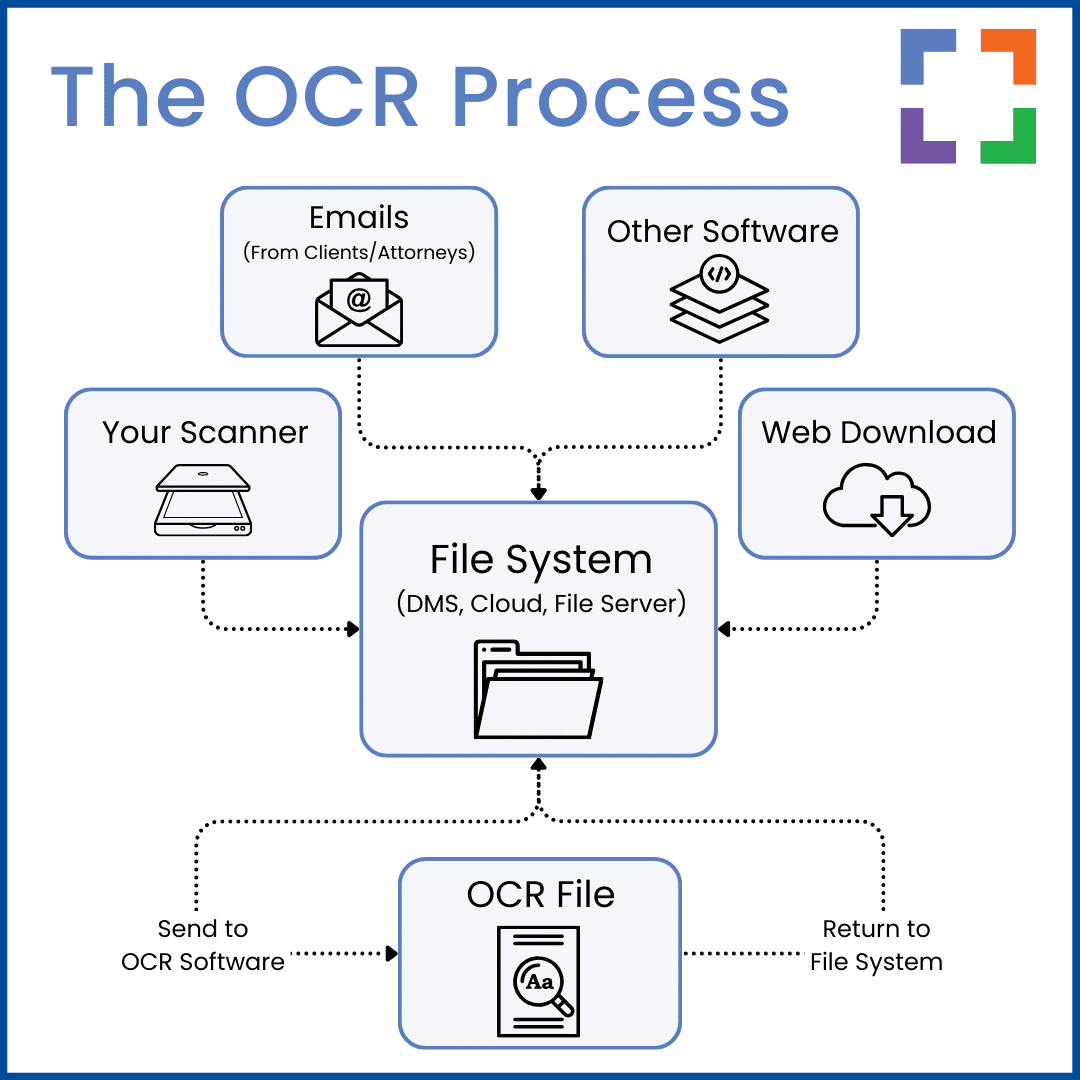
OCR Challenges
Optical character recognition (OCR) is essential for firms that often use PDFs.
If you’ve ever emailed a scanned PDF and found you couldn’t select or copy the text, you understand the importance of OCR, which converts scans into full-text documents.
Without OCR, scanned PDFs are not searchable. Centralized email management with integrated OCR ensures attachments are indexed for quick retrieval and production.
Luckily, there are tools available to you to help you meet these challenges head-on. Specifically: Email Management.
Email Management functionality is a subset of Document Management functionality, often found in a Document Management System (DMS).
LexWorkplace Top Features
Cloud-based Document Management
- Automatic, Integrated OCR
- Secure Cloud Storage
- Client/Matter-Centric Org
- Full-Text Document Search
- Secure Client Sharing
- MS Office Add-In
- Email Management
- Windows + Mac Compatible
Related – Best Document Management Software for Law Firms: For law firms, managing documents optimally is key to success and progress. Learn more.
3 Ways You Might Be “Managing” Email (And Why You Should Stop)
Many firms feel like they have email handled because they stash messages somewhere—folders, PDFs, or practice management. In reality, these approaches fall short of true email management.
Here are the three most common methods and why they don’t work.
1. In Outlook With Folders
The most common way to “manage” emails is by using folders in Outlook, with each team member organizing their own inbox. This is the default method for most firms.
Personal Outlook folders decentralize communication. Each person builds a different structure, so threads fragment across mailboxes and the firm loses shared visibility.
Furthermore, all of the emails are now saved inside Outlook or Gmail while other documents are saved elsewhere in a separate system.
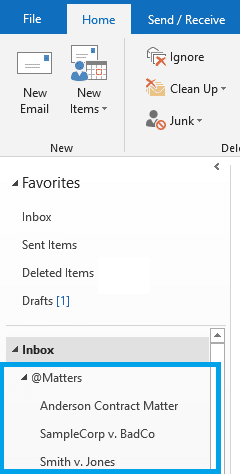
Using this method, locating all matter-related information is a tedious process that often results in mistakes and unnecessary frustration.
2. Saving Emails to PDF
Saving emails to PDF creates blind copies with limited headers and weak search. It is time-consuming and easy to miss attachments or context across a long thread.
That’s assuming you and your team even remember to save every document from each email.
3. Saving Emails to Practice Management Software
Some practice management tools capture emails through a CC or BCC address. This can duplicate messages and still leaves you without unified search across emails and documents.
While this is better than relying on Outlook folders, Document Management Systems (DMS) are generally better for email management. Case management apps, even if they allow email storage, often lack effective search capabilities.
Clunky indexing makes finding important documents difficult, and in a busy firm, even a few minutes spent searching for a file is too long.

Related – Practice Management vs. Document Management Software: Do they sometimes share features? Sure. However, they’re not the same.
LexWorkplace Demo + Free Trial
Use this trial to fall in love with our:
- Helpful Demonstration and Assisted Setup
- Optimal Organizational Tools
- Seamless Email Integration
- Effective Document Management
- Ready-to-Help Consultants
Ready to Try the Last DMS You’ll Ever Want?
Email Management Tips for Lawyers
Lawyers work out of overflowing inboxes. A few simple habits, paired with the right system, can make email far more manageable.
Give the Team Shared Visibility
File client emails to the matter so everyone sees the full thread. New team members can ramp quickly without digging through someone else’s inbox.
Protect Client Confidences
Use encryption, multi-factor authentication, and least-privilege access to safeguard client communications as required by professional responsibility rules. Train your team to verify wire instructions through a second channel, and enforce security on personal devices used for firm email (strong passcodes and the ability to remotely wipe firm data).
File as You Go from Outlook to the Right Matter
Use the Outlook add-in to file messages and attachments to the active matter as you read them. Your team can then search and reuse the thread with the rest of the case record.
Use Smart Suggestions to Speed Filing
Use sender and domain association to suggest the correct matter on new threads from known clients and counsel.
One click files the message and attachments.
Apply Retention and Legal Holds
Use matter-based retention rules, and place a legal hold when litigation is anticipated so relevant emails are preserved for discovery.
By following these tips and integrating an Email or Document Management System, lawyers can maintain efficient communication and organized document handling.
What is an Email Management System (EMS)?
The bottom line: Personal inbox tools are not designed to store matter communications. An EMS centralizes email by matter so your firm can search, secure, and apply retention consistently.
Law firms should adopt an Email Management System (EMS) as part of their protocol to streamline how emails and data are stored, organized, and accessed. An EMS integrated with a DMS saves emails to each matter, alongside other relevant files.
An EMS is a core function within a proper Document Management System (DMS), like LexWorkplace.
LexWorkplace Success Story
See how one law firm uses LexWorkplace to organize their documents and streamline their practice.
Book a 15-Minute Demo
Features of an Email Management System
To get a true picture of what an EMS does when compared with default methods, it’s best to take a look at the features.
Any solid law firm email management system should consist of:
Matter-Centric Storage
Store emails and attachments with the matter so the team can see the full history next to documents, notes, and tasks.
Organized, Searchable Email
Use a consistent structure and powerful search (keywords, filters, tags) to quickly locate any message or attachment.
Security & Governance
Apply encryption, multi-factor authentication, ethical walls, and audit trails so only the right people can see and act on client emails.
Archiving, Backup & Integrations
Retain and back up messages according to firm policy, and integrate with case management and billing tools so you avoid double entry and scattered data.
Email Retention, Archiving, and Destruction for Law Firms
Most firms either keep every email forever or leave retention up to each lawyer. Both create risk. A formal, written email retention policy helps you control storage, respond to discovery, and reduce malpractice exposure.
Your policy should define:
- Which emails you keep (client, internal, admin, marketing, etc.)
- Where they live (inbox, DMS/EMS, separate archive)
- How long they’re retained and when they’re eligible for deletion
- Who can place or release legal holds when a dispute or investigation arises
Archiving and retention work together. An email archive is more than extra storage; it preserves messages and metadata (headers, timestamps, recipients) in a structured way that supports e-discovery and regulatory obligations.
Finally, include a clear destruction process. Once the retention period expires and no legal hold applies, email should be purged according to policy—not left indefinitely. Automated retention rules in your EMS or DMS help enforce that policy consistently, so you keep what you need and defensibly delete what you don’t.
How to Develop an Email Management System for Your Firm
Whether you’re implementing a new email management system or upgrading your current one, here are the basics to consider:
Develop an EMS That Works With Your Current Tech Stack
If your firm uses Outlook and Exchange or Microsoft 365, choose an EMS that files directly from Outlook via an add-in.
Confirm supported platforms and versions in the Integrations documentation.

Related – How to Use Office 365 for Law Firms: Office 365 is a valuable suite of tools. Read to learn how to apply the suite for law firms.
Integrate, Integrate, Integrate
Next, connect your EMS to your email service. Confirm it supports your version of Outlook or Exchange and that responsive support is available if you need help.
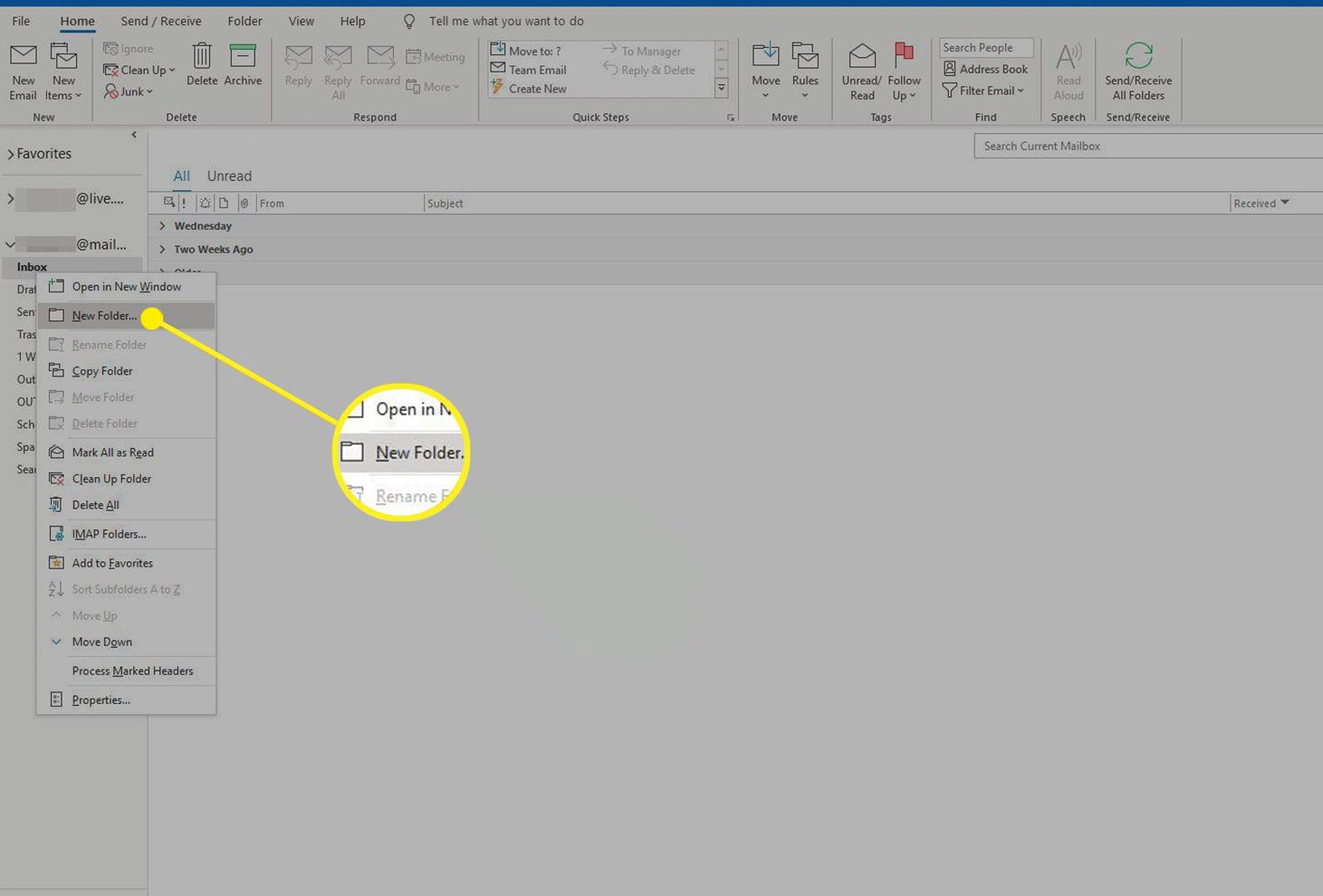
Organize Folders by Client or Matter
Once integrated, start organizing your emails. Create folders for each client or matter, and set these up for active clients right away to stay ahead on email management.
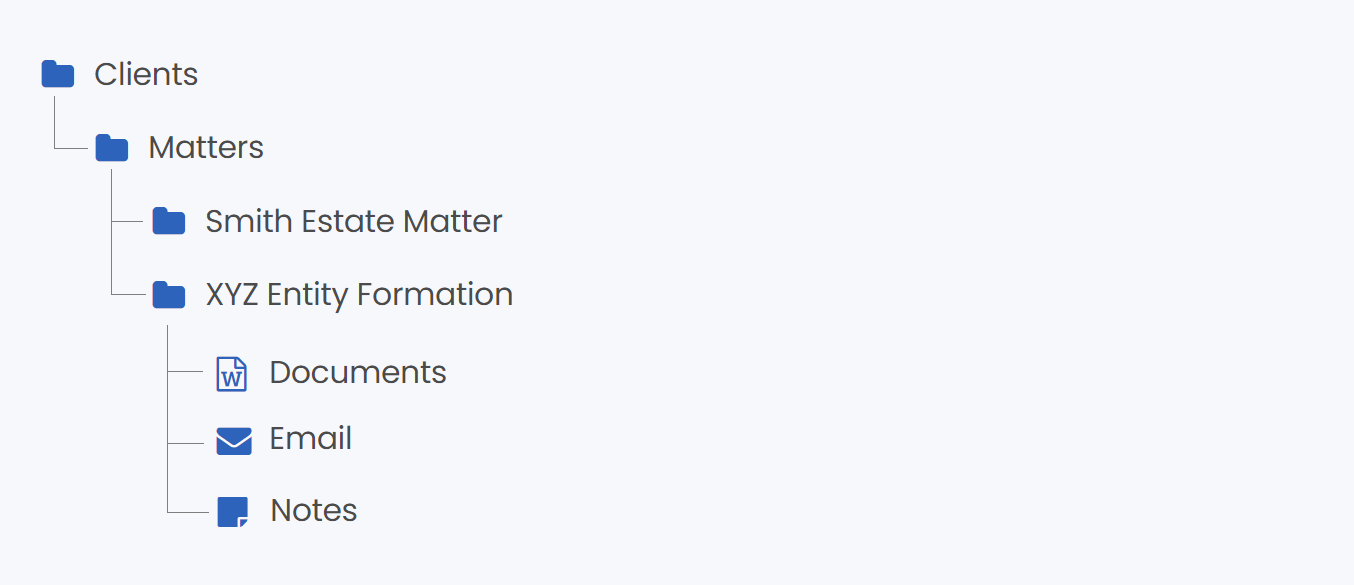
As you take on new clients, simply add new folders. Most EMS options let you do this directly within your email, making it easy to organize without switching between multiple tools.

Related – Best Client Portal Software for Law Firms: Client portals streamline your practice and improve your client communication. Learn more.
Migrate Stored Emails to Your EMS
If you currently store emails elsewhere, migrate them into your EMS so the team has one consistent place to find the full record going forward.
Consider Using an Email Archive Tool
Need extra storage to ensure you never lose an email? An email archive tool is a great solution. These tools store copies of every email sent or received by your law firm, covering any missed or accidentally deleted emails.
Options like Microsoft Exchange Online Archiving integrate seamlessly with Outlook.
If you’re reading these steps and thinking, “There must be another way…”
There is.
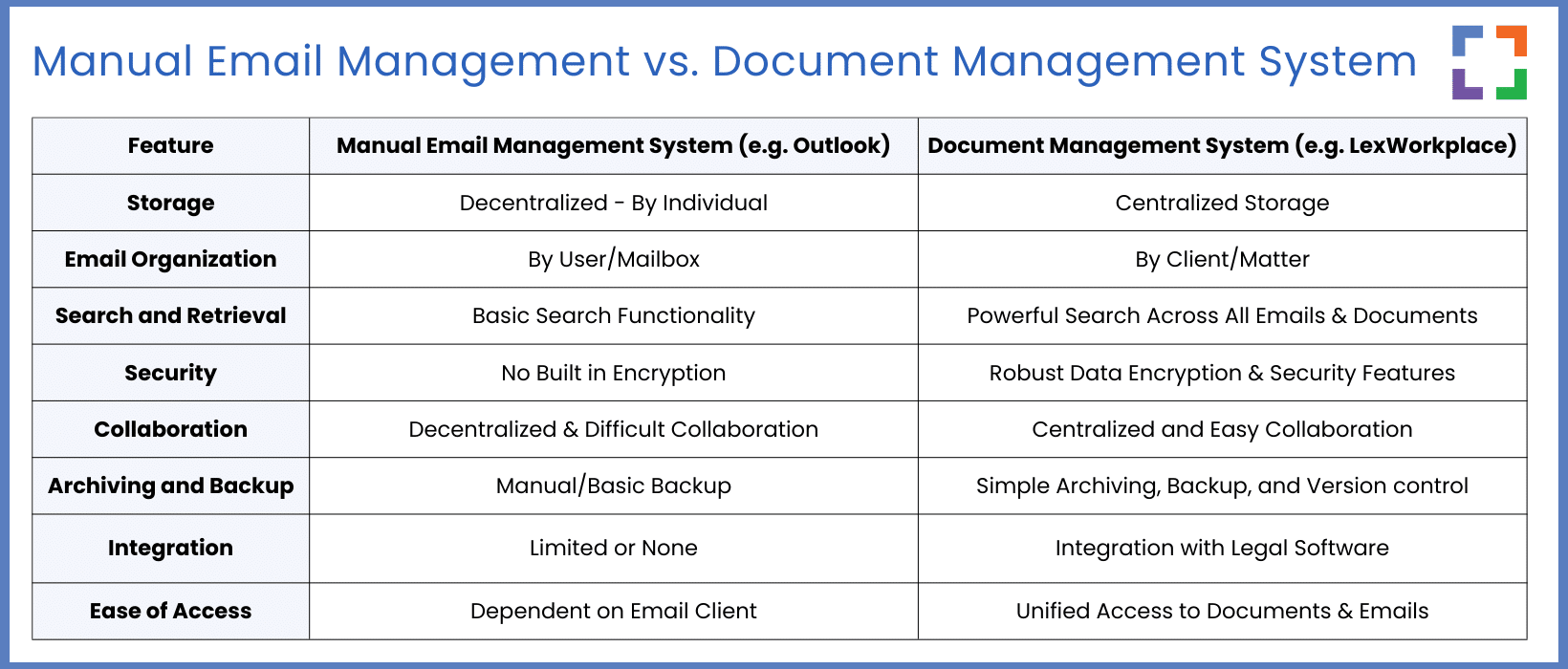
Document Management Systems such as LexWorkplace include built-in email management, which makes filing and finding messages much easier than standalone methods.
See the main features compared below.
Drive Adoption Across Your Firm
The best email management system only works if people use it consistently.
- Appoint practice-area champions to model filing behavior and answer questions.
- Offer short, targeted training in Outlook and your EMS so filing becomes second nature.
- Track simple adoption metrics (such as the percentage of client emails filed to matters) and adjust your process or training as needed.
What Is a Document Management System (DMS)?
While solo or smaller firms can benefit from an EMS, larger teams need more.
For them, we recommend choosing a Document Management System (DMS) that includes email management, rather than a standalone EMS.
A DMS stores both emails and documents, with powerful tools to find, organize, and manage them. It can be cloud-based or on-premise (though we don’t recommend the latter).
Basic cloud drives and practice management apps store files. A legal DMS adds profiling, versioning, permissions, and matter-centric email so everything for a case lives together.
Related – Document Management vs. Basic Cloud Storage: Though there is some overlap between the two, knowing which one you need is essential knowledge.
Features of a Document Management System (DMS)
Of course, a DMS will include robust email management features such as the ability to save emails to specific matters straight from your inbox.
However, there are other features included inside a DMS that will greatly benefit your firm:
- Full File Storage: A DMS stores all documents, not just emails, including client intake forms and contracts. A cloud-based DMS lets you access files from anywhere.
- Document Profiling: Apply attributes like classifications, types, and tags for easy indexing. You can also add notes for additional context.
- Full-Text Search: Search across documents and emails, retrieving results from filenames, metadata, and content.
- Document Check-In/Check-Out: To prevent editing conflicts, check documents in and out, locking them while in use.
- Version Management: Automatically track document versions, view changes, and revert to previous versions if needed.
- Permissions and Access: Control access to matters, documents, and emails, ideal for collaborating with external partners.
- OS Compatibility: Works on Windows and macOS desktops, plus iOS and Android mobile devices.
- Security: Offers robust security with end-to-end encryption for optimal protection.
LexWorkplace: Modern Email Management for Law Firms
If you’re looking for a complete document management system that includes robust email management features, LexWorkplace is an excellent choice. LexWorkplace was built specifically for law firms that need matter-centric document storage and management tools.
Email Management for Law Firms Inside LexWorkplace
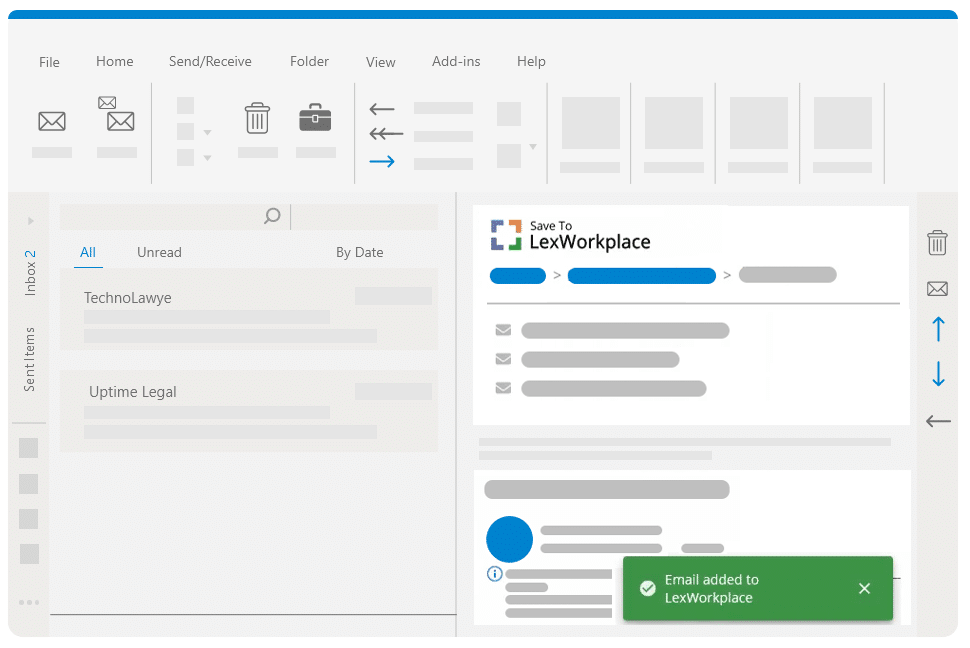
LexWorkplace lets you save emails directly to a matter file from Outlook. These emails can be shared, reviewed, and searched by your team through a simple interface.
Emails and attachments are fully indexed and searchable. You can view, open, and manage emails alongside your documents.
LexWorkplace de-duplicates messages, preserves headers and threads, and lets you view and manage emails alongside documents. Your case record stays complete and searchable.
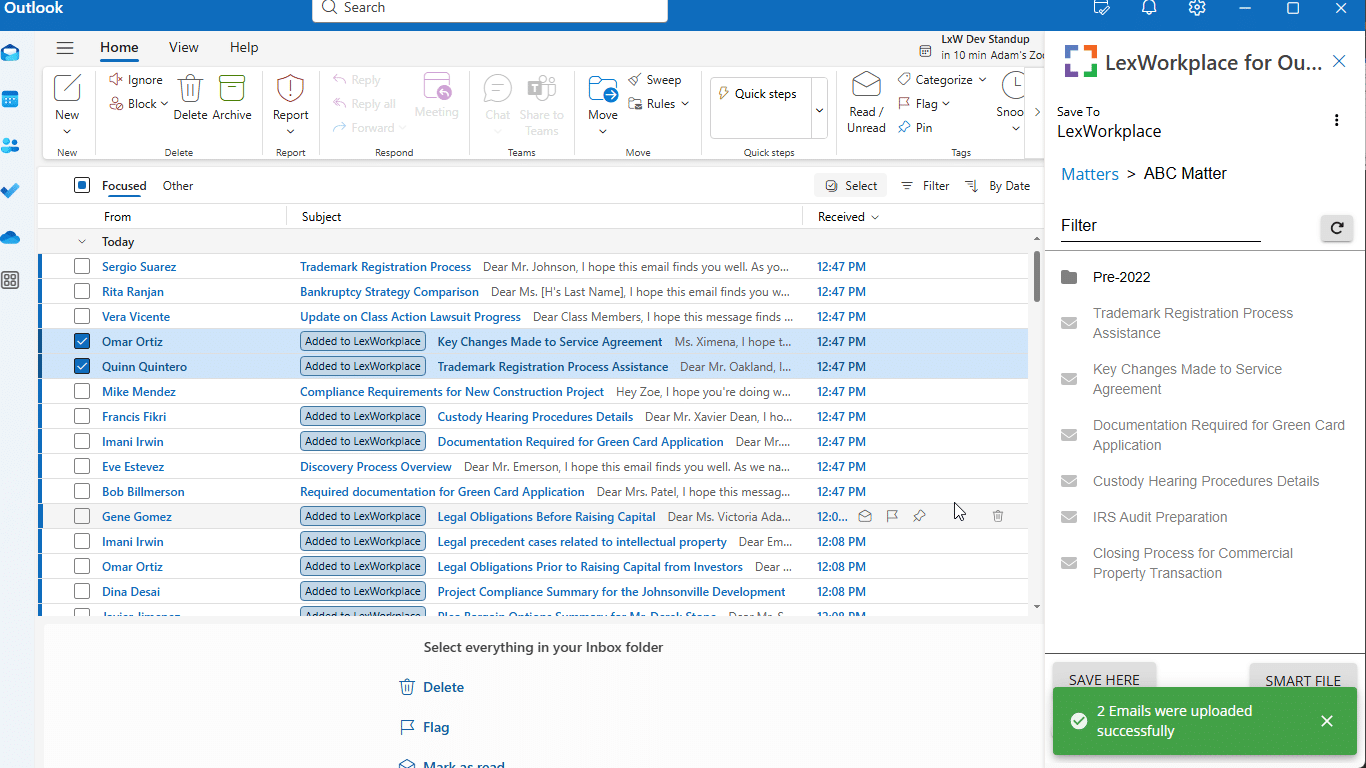
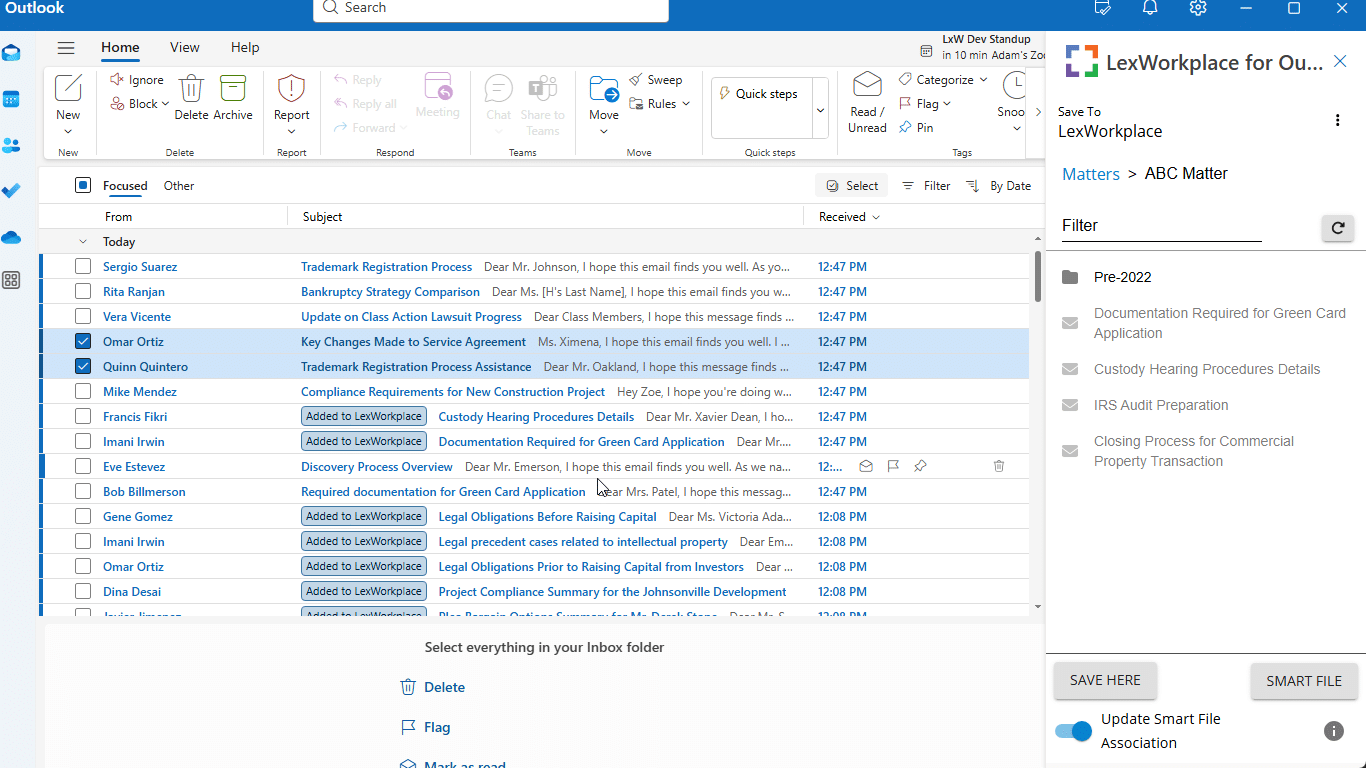
Multi-Select & Smart-File
Email Multi-Select lets you quickly file up to 100 emails at once into the correct matter.
Smart-File remembers sender-to-matter associations and automatically suggests the right place for future emails.
View, Store & Manage Your Emails All in One Place With LexWorkplace
Managing your firm’s emails shouldn’t be a hassle. Instead, LexWorkplace, the law firm document management system, can help you ensure your critical emails and documents are at your fingertips when you need them.
To learn more about LexWorkplace, reach out to us today.
Frequently Asked Questions - Email Management for Law Firms
Law firms often grapple with an overwhelming volume of emails, difficulty in prioritizing and categorizing messages, concerns about data security, and challenges in team collaboration and communication.
Law firms can enhance email management by prioritizing and categorizing emails, using templates for quick responses, scheduling dedicated time for email management, optimizing inboxes with rules and filters, and minimizing distractions.
An EMS helps law firms automate and streamline the process of managing emails. It can categorize, prioritize, and filter emails, ensuring that important messages are not overlooked and that data is handled securely.
LexWorkplace, a DMS designed for law firms, integrates email management with document storage, providing a unified view of all communications and case files. It offers features like secure storage, easy retrieval, and collaborative tools.
Transitioning to a DMS allows law firms to seamlessly integrate email management with document storage and collaboration, enhancing efficiency, security, and organization.
Law firms should prioritize solutions that offer robust security features, including data encryption, secure access controls, and compliance with legal industry standards to safeguard sensitive information.
To ensure a smooth transition, law firms should strategically plan the implementation, provide comprehensive training to their team, and continuously seek ways to enhance and adapt their processes to the evolving landscape.
Looking for Document Management Software?
LexWorkplace:
Modern Document Management for Law Firms
LexWorkplace is document & email management software, born in the cloud and built for law firms. Here’s a quick primer on how it works, or get your free trial to discover LexWorkplace for yourself.
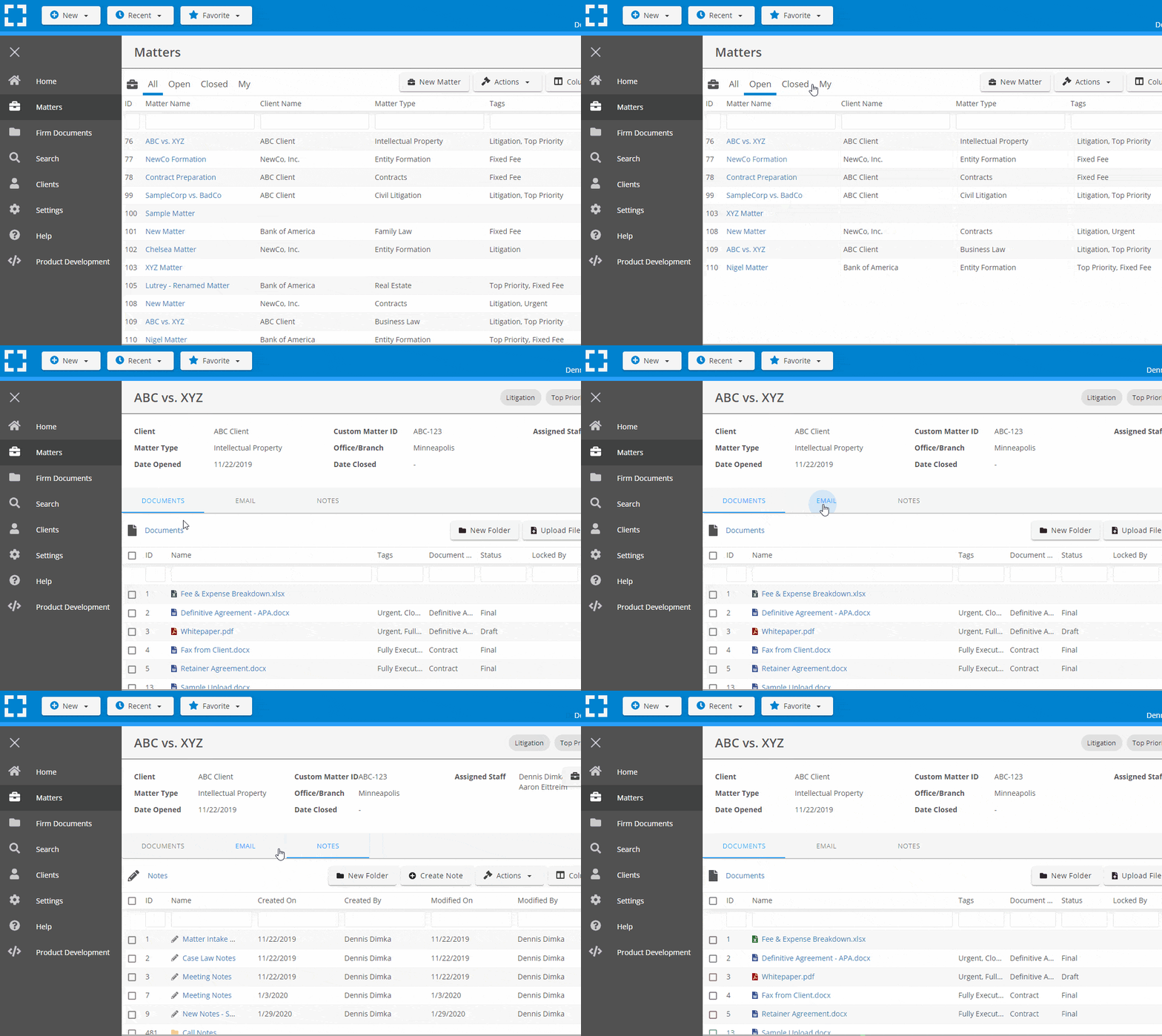
Organize by Client & Matter
Organize documents, email and notes by client or matter. Store and manage all data for a case or project in one place.
Go Beyond Basic Files & Folders
Supercharge your firm’s productivity with true DMS functions.
- Version Management
- Document Tagging & Profiling
- Document Check-Out / Check-In
- Microsoft Office Integration
- Automatic, Integrated OCR
- Convert Word Docs to PDF
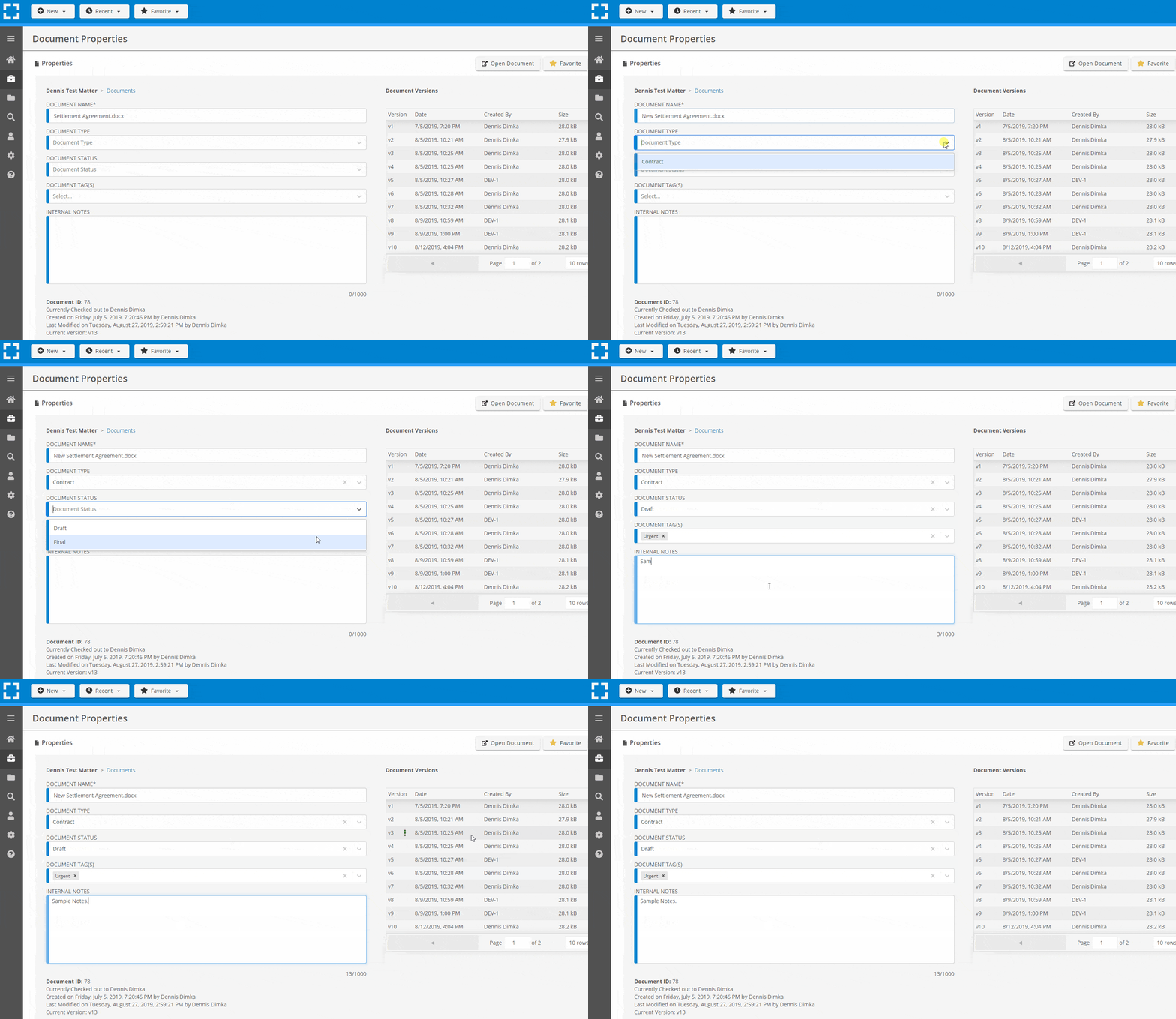
Search Everything
LexWorkplace is like Google for your law firm. Search across millions of pages, documents, folder email and notes in seconds. Refine your search by matter, document type, author and more.
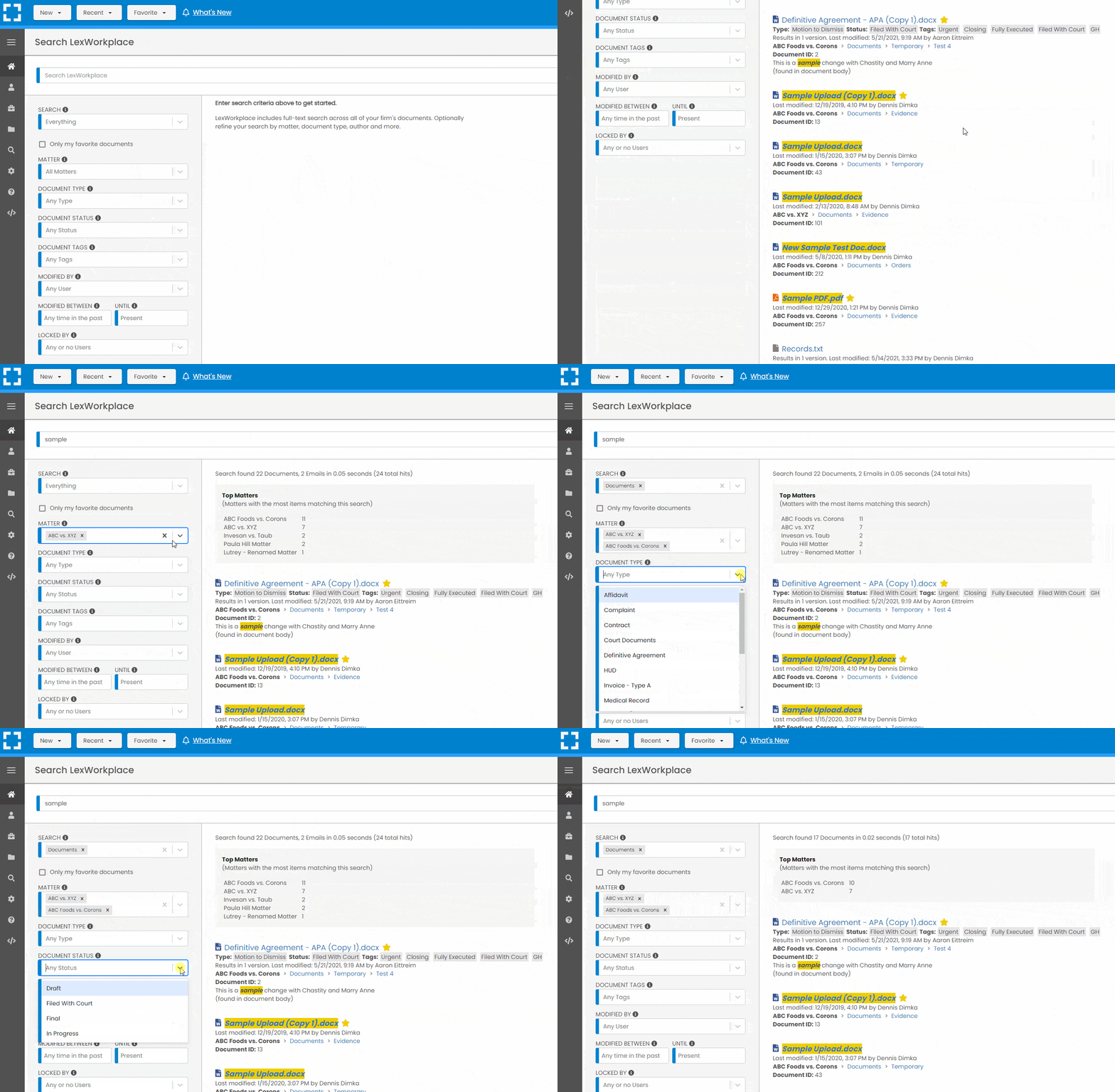
Search by…
- Client or Matter
- Document Type (Contract, Complaint, Order, etc.)
- Document Status (Draft, Final, etc.)
- Document Tags (Filed With Court, Fully Executed, etc.)
Outlook Integration + Comprehensive Email Management
Save emails to a matter without leaving Outlook. Saved emails are accessible to your entire team, organized and searchable.
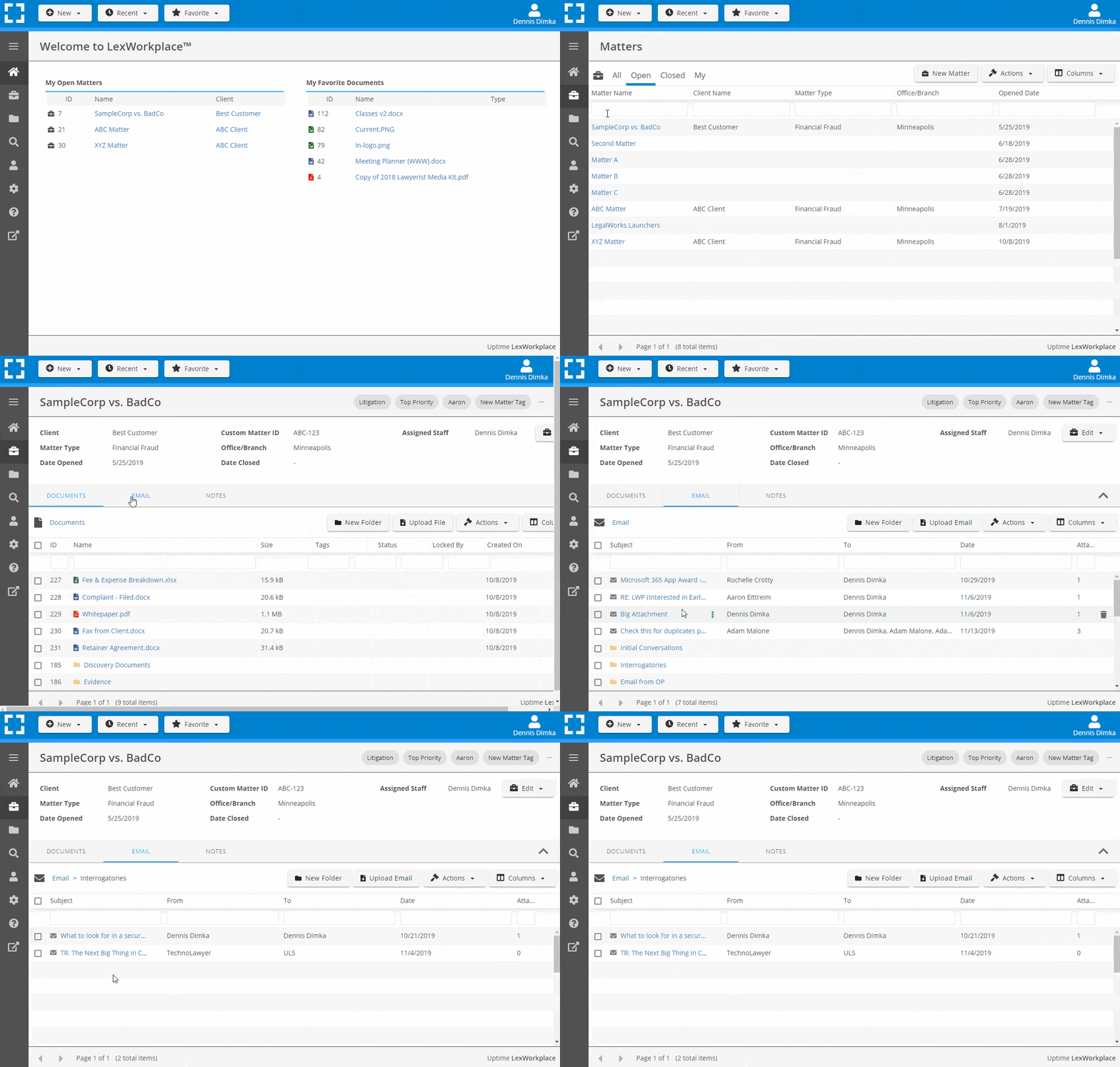
- Outlook Add-In that Works With Windows and Macs
- Save Entire, Original Email to a Matter in a LexWorkplace
- Email De-Duplication
- Organize Emails into Folders, Subfolders
Works with Windows and Macs
All of LexWorkplace is compatible with both Windows and Mac computers.
Next Steps
See What Clients Have to Say
Lawyers love LexWorkplace. See how the system streamlined one lawyer’s practice.

Watch the 5-Minute Demo
See LexWorkplace in action in our quick 5-minute overview and demonstration.
Or, if you want a one-on-one demo, or want to talk about LexWorkplace for your firm, schedule a call or demo below.
You Might Also Like
Introducing the New Look of LexWorkplace
Meet the new LexWorkplace: a fresh logo…

Best Legal Document Management Software for 2026 | Buyer’s Guide
Exploring the best legal document…

12 Ways LexWorkplace Will Help Your Firm Do More With Less
Modern law firms need modern tools.…
Want More Legal Technology Tips?
Subscribe to Uptime Legal to get the latest legal tech tips and trends, delivered to your inbox weekly.