Table of Contents
Every law firm knows that managing documents well isn’t just a nice-to-have; it’s essential for running an efficient, secure, and client-focused practice.
But even the best-intentioned teams can fall into some common document management traps that cost time, create frustration, and sometimes even put sensitive information at risk.
The good news? Once you know what to watch for, these mistakes are easy to avoid with the right strategies.
In this article, you’ll learn:
Ready to make document management work better for your firm? Let’s dive in.
Learn how you can improve your law firm’s document management.
Mistake #1: Failure to Standardize Document Naming Conventions
Inconsistent naming conventions are a hidden but huge source of wasted time in law firms. When each staff member names files their own way, finding the right document can feel like searching for a needle in a haystack.
Consider this scenario: one attorney saves a motion as “Client_Motion,” another saves it as “Motion_Client,” and yet another simply calls it “Motion_Final.” When someone needs to retrieve that document later, they’ll have no idea which to pick, wasting valuable time and increasing the risk of mistakes.
The solution is simple but effective: establish a clear naming convention for the entire firm to follow.
A standardized format, such as “ClientName_DocumentType_Date” (e.g., “Johnson_Motion_2024-11-01”), can make a world of difference. Providing a short guideline with examples keeps everyone on the same page.
Standardizing naming conventions helps your team locate documents faster, reduces duplicate files, and fosters smoother collaboration.

Mistake #2: Insufficient Version Control Processes
Without a solid way to track versions, law firms can end up in a real bind: outdated or incomplete documents getting mixed in with current ones.
When multiple people edit the same document without a system to keep it all straight, it’s easy to lose track of which version is accurate and up-to-date, leading to costly errors and a lot of wasted time.
Picture this: Sarah, an attorney, works late into the night on an important motion. She saves her changes and heads home, thinking the document is all set. But earlier that day, her colleague Ben also made edits on a separate copy.
Without a system to manage versions, Sarah’s updates overwrite Ben’s work. Now, both of them are left scrambling to figure out what got lost, with a real risk of submitting an incomplete document.
This is where LexWorkplace steps in to make life easier. LexWorkplace’s version control feature automatically creates and tracks document versions, so team members don’t have to worry about overwriting each other’s work.
Each version is saved with a timestamp, and users can add comments to notable updates, making it easy to see who changed what. You can even review and restore previous versions with just a click — perfect for those “what happened to my edits?” moments.
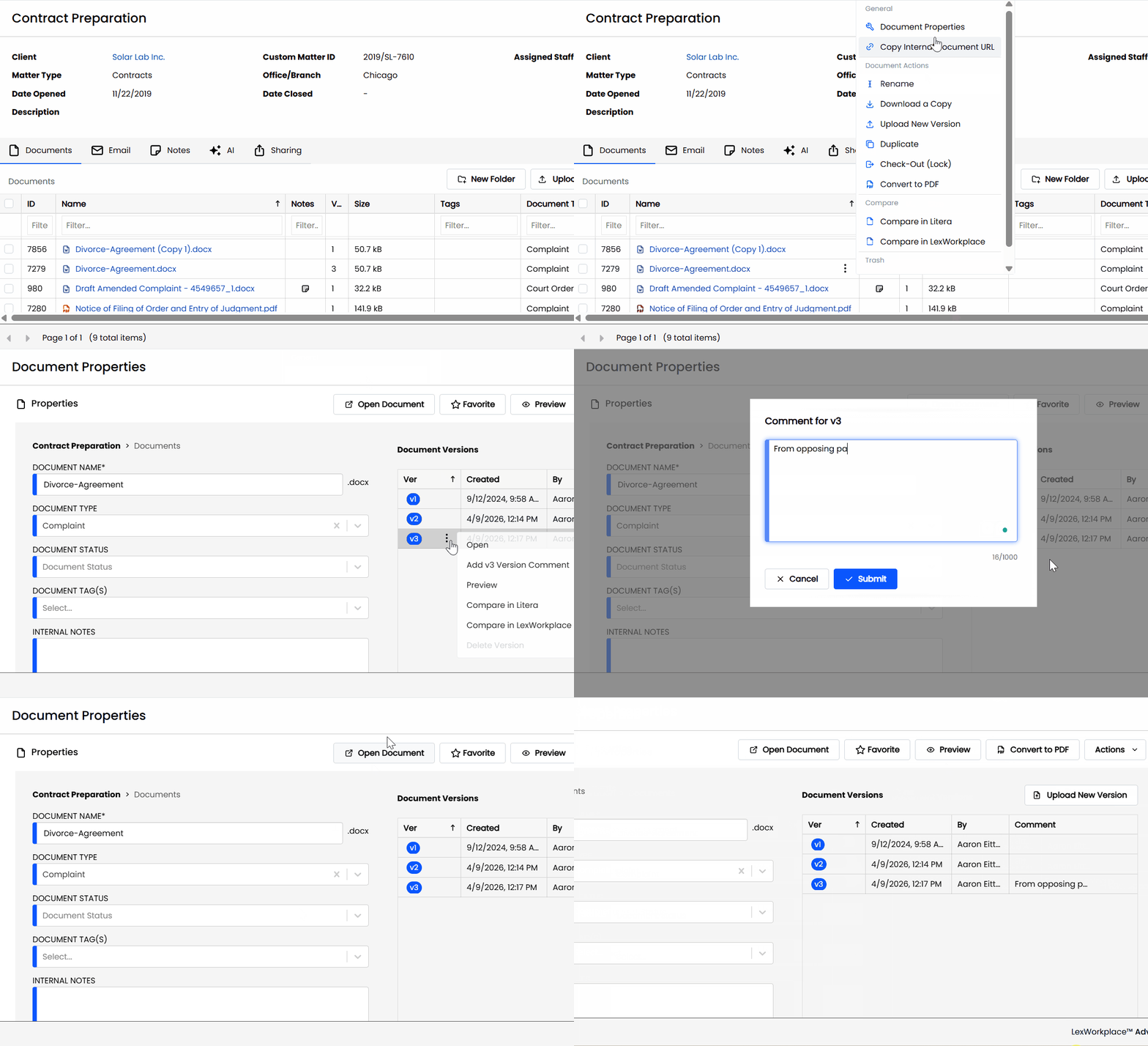
With LexWorkplace’s version control, your team can avoid those “lost edits” headaches and always have access to the most accurate, updated document.
Mistake #3: Inadequate Document Security and Access Control
If your document security isn’t airtight, you risk putting sensitive client information at serious risk. Your firm probably handles a lot of confidential data, from case strategies to personal client details, so strong security and access controls are non-negotiable.
Imagine this: an employee shares their password with a colleague, indirectly giving them access to sensitive files. Now, confidential client information could be accessed by people who shouldn’t see it, putting your firm at risk for data breaches.
This can bring about legal and regulatory trouble while damaging client trust should someone find out.
The fix? Use a document management system with built-in security, like role-based access control and two-factor authentication.
LexWorkplace has these features built in, making it a great choice for law firms focused on security. You can set specific access rules based on each user’s role, so only the right people have access. And with two-factor authentication, it’s much harder for unauthorized users to break in, giving you that extra peace of mind.
Mistake #4: Using Decentralized or Outdated Digital Systems
When your team relies on outdated or scattered systems, it’s nearly impossible to work efficiently. With documents spread across local drives, cloud storage, and email attachments, just finding the latest version can turn into a wild goose chase. This setup slows everyone down, creates confusion, and makes collaboration harder than it needs to be.
If files are stashed in different places, team members waste time trying to locate or share the right document. And when you’re on a tight deadline, that extra time spent digging around for files isn’t just frustrating — it’s costly.
Switching to a centralized, modern document management system keeps everything organized in one place, making it quick and easy for your team to access the latest files.

Best Legal Document Management Software
Learn about the industry’s top legal document management software.
Mistake #5: Failure to Regularly Back Up Documents
Backing up your files is like having insurance — you hope you’ll never need it, but if something goes wrong, you’ll be glad it’s there. Without a solid backup system in place, your team is just one tech glitch or cyberattack away from losing critical documents. Imagine the panic of realizing months of work on a major case vanished overnight because of a system crash or a malicious attack.
Yet, some firms skip regular backups, thinking it won’t happen to them. But tech can be unpredictable, and data loss is always a possibility.
Setting up automatic, regular backups is simple but powerful. A cloud-based backup system is a great option because it saves your files securely and makes them accessible from anywhere. With regular backups, you can keep cases moving forward, knowing that if something goes wrong, your files are safe and ready to be restored.
A strong backup plan means your team can work with confidence, knowing that even if the unexpected happens, they’re covered.
Smarter Document Management for Your Law Firm
Getting your document management in order is a game-changer. By tackling these common pitfalls like inconsistent naming, poor version control, weak security, scattered storage, and missing backups, you’re setting your firm up for smoother workflows and stronger client trust.
Small changes, like creating naming rules or centralizing files, can make a huge difference in productivity and peace of mind.
Ready to step up your document management? With the right tools and practices, you’ll make finding, sharing, and securing files easier than ever for your whole team.