
AI for Legal Documents: Best Tools and Use Cases for Law Firms
AI for legal documents helps law firms draft, review, summarize, and manage files more efficiently. This article explains what that means in practice, where AI can actually help, and what law firms should look for before adopting a tool.
Just here for the list of legal AI tools? Skip ahead to the full roundup.
In This Article
Why Law Firms Are Paying Attention to AI
Law firms are paying attention to AI for a simple reason: document work takes time. Drafting, reviewing, comparing, summarizing, and searching through legal files all demand careful attention, and much of that work is repetitive.
AI is getting traction because it can reduce some of that manual effort. It can help legal teams move through first drafts faster, surface key clauses more quickly, compare versions more efficiently, and summarize long files without starting from scratch every time.
That does not mean AI replaces lawyers. It means lawyers can spend less time on the first pass and more time on legal judgment, strategy, and client service.
As more firms look for ways to work faster without lowering quality, AI has become part of the conversation. The firms getting the most value from it are usually not the ones chasing hype. They are the ones using it to solve specific workflow problems.
Related – AI and Lawyers: Learn what every lawyer should know about the rise of AI in the legal industry.
How AI Is Changing Law Firm Workflows Overnight
In the past two years, adoption of AI for legal documents has surged, with over 40% of law firms now using AI in at least one document-related workflow.
AI is showing up most often in document-heavy work. Law firms are using it to generate first drafts, review contracts, compare versions, summarize transcripts, extract key clauses, and answer questions about document contents.
That is where the practical value is. Instead of treating AI like a novelty, firms are using it to reduce friction in everyday legal work.
- CoCounsel performs contract analysis and assists with deposition preparation
- HarveyAI supports redlining and case research
- LexWorkplace combines document management with AI-powered document Q&A and contextual prompts in a secure, legal-specific platform
Why Waiting to Adopt AI Can Cost You Clients
The longer a firm relies entirely on manual document processes, the harder it becomes to keep pace. Slow review cycles, repetitive drafting, and difficult file retrieval all add friction to work that already takes time and care.
AI will not solve every problem, and it should not be used without oversight. But for many firms, it can remove enough low-value repetition to make the rest of the work move more smoothly.
Bring AI to Your Legal Documents
LexWorkplace Includes:
- Interactive Document Conversations: Engage in a ChatGPT-like dialogue with LexWorkplace AI to discuss document contents and related subjects.
- Contextual Query Suggestions: Receive automatic, context-specific question prompts about any document, helping you delve deeper into its details.
- Seamless Integration and Saving: Click the AI icon to start discussions and easily save conversations as Matter Notes within LexWorkplace.
Discoverability is shifting too.
When prospects search for legal questions, Google may now display AI-generated answers at the top of the page through AI Overviews (AIO), changing what people see first.
To stay visible as this evolves, ensure your content clearly answers common client questions, demonstrates expertise, and learn how to get featured in Google’s AI Overviews.
Best AI Tools for Legal Documents
The best AI tool for legal documents depends on the kind of work your firm needs help with. Some tools are built for legal research and drafting. Others are stronger for contract review, document summarization, or document management. The goal is not to find the flashiest tool. It is to find one that fits the way your firm actually works.
Leading Legal-Specific AI Tools

CoCounsel by Thomson Reuters
AI-powered legal assistant built for document review, legal research, contract analysis, and matter preparation.
Why Use This Tool? CoCounsel is a strong fit for firms that want legal-specific AI inside a research and workflow ecosystem they already trust.
- Supports legal research, document review, drafting, and contract analysis
- Helps attorneys move through research-heavy and document-heavy work more efficiently
- Built for legal workflows rather than general business use
- Makes the most sense for firms that want AI tied closely to Thomson Reuters tools

HarveyAI
Legal-specific AI assistant focused on drafting, analysis, research, and broader law firm workflows.
Why Use This Tool? Harvey is best suited for firms looking for a legal-focused AI platform rather than a general text tool.
- Supports drafting, contract analysis, due diligence, and research tasks
- Strong fit for firms that want a more specialized legal AI environment
- Useful when legal teams need help with both document work and broader legal analysis
- Better choice than a general AI tool when legal workflow fit is the priority

LexWorkplace
Cloud-based legal document and email management system with built-in AI tools for document summaries, document Q&A, and search.
Why Use This Tool? LexWorkplace is a strong fit for firms that want AI inside a cloud-based document management system instead of as a separate tool.
- Combines legal document and email management with AI-powered document help
- Makes it easier to summarize documents and ask questions about document contents
- Includes strong search across documents, metadata, and matter-related content
- Best suited for firms that want AI working inside an existing legal document workflow

Lexis+ AI
AI-enabled legal research and drafting assistant built around LexisNexis content and citation-backed output.
Why Use This Tool? Lexis+ AI is a strong option for firms that want AI support tied closely to legal research and source-grounded drafting.
- Useful for drafting, analysis, and research-heavy tasks
- Stronger fit than a general AI tool when citation support matters
- Designed for firms that already rely on LexisNexis research content
- Better suited for legal writing and analysis than broad general-purpose AI
Clio Duo
AI companion built into Clio Manage for matter summaries, task support, document interaction, and administrative help.
Why Use This Tool? Clio Duo makes the most sense for firms that already work inside Clio and want AI support within that environment.
- Helps summarize documents and provide matter-level updates
- Useful for administrative efficiency and day-to-day workflow support
- Strong fit for firms that want AI inside their existing practice management platform
- Better for Clio-centered firms than for firms looking for standalone document intelligence

Gavel Exec
AI contract review and redlining assistant built for transactional lawyers and contract-heavy legal teams.
Why Use This Tool? Gavel Exec is a strong choice for firms that spend a lot of time reviewing, negotiating, and revising agreements.
- Focused on contract review, redlining, and clause-level analysis
- Useful for firms that want AI close to the drafting environment
- Works well for contract-heavy workflows that live in Microsoft Word
- Better fit for transactional work than broader legal research tasks
Generic but Useful AI Tools
Not every firm starts with a legal-specific AI platform. Some begin with more general tools for early drafting, summarization, brainstorming, or internal review. These tools can still be useful, but they usually require stronger internal guardrails and more careful attorney oversight when used around legal documents.

ChatGPT
General-purpose AI tool that can help with early drafting, summarization, brainstorming, and internal review when used carefully.
Why Use This Tool? ChatGPT can still be useful for legal teams, but it works best as a supervised starting point rather than a legal-specific solution.
- Helpful for first drafts, summaries, and plain-language explanations
- Useful for brainstorming or organizing ideas before attorney review
- Better for limited, supervised document tasks than for legal-specific workflow depth
- Requires clear internal guardrails and careful review before anything is relied on or shared

Claude
General-purpose AI tool that is especially useful for analyzing long documents, summarizing dense material, and working across uploaded files.
Why Use This Tool? Claude is a strong generic option for firms that want help with long, document-heavy tasks under attorney supervision.
- Useful for summarizing long documents and pulling out key points
- Supports file uploads, including PDFs and DOCX files
- Better suited than many general tools for working through large amounts of document context
- Works best as a supervised drafting, review, and summarization aid rather than a legal-specific platform

Gemini
General-purpose AI tool that is especially useful for drafting, refining, and summarizing documents inside Google Workspace.
Why Use This Tool? Gemini makes the most sense for firms that already work heavily in Google Docs and Drive and want AI help inside that environment.
- Useful for summarizing documents and refining drafts in Google Docs
- Can use other files from Drive as sources when writing or editing
- Strong fit for Workspace-based teams that want AI built into familiar tools
- Still requires clear guardrails and attorney review when used around legal documents
What Is AI for Legal Documents?
You already know AI can draft an email or answer a question. In legal work, the same technology can read complex contracts, find key clauses, and compare versions with a level of speed no human can match. The difference is that legal AI is trained and tuned for the language of the law, so it understands more than just plain English.
When it works well, it becomes a quiet partner in your workflow. It handles the repetitive but important tasks, giving you back hours for client work and case strategy.
How AI Fits Into Legal Document Workflows
These core technologies are not just behind the scenes. They show up in the everyday work of law firms, quietly powering tasks that used to demand hours of manual effort:
- Draft contracts, motions, and letters in minutes by drawing on templates, past matters, or plain-language prompts
- Spot risky clauses or missing provisions during contract review with tools that scan large documents in seconds
- Compare document versions to highlight even the smallest edits that could change meaning
- Condense lengthy agreements or filings into clear summaries that are easy to review at a glance
- Verify citations and references to ensure case law is still valid and properly formatted before submission
When these steps are handled quickly and consistently, attorneys can spend more time on strategy, advocacy, and client relationships.
Core Use Cases for Law Firms
AI is most useful when it helps with real work, not abstract possibilities. These are some of the clearest ways law firms are using AI in document-heavy workflows.
Faster First Drafts
AI can help lawyers generate a starting draft for contracts, letters, and other common legal documents. That is especially useful when the work begins from a known structure or repeatable format.
Attorneys still need to review the draft carefully, but AI can reduce the time spent getting from a blank page to a workable first version.
Smarter Contract Review
AI can help flag unusual clauses, missing provisions, inconsistent terms, and language that deserves closer review. That makes contract review more focused and more efficient.
It does not replace attorney analysis. It helps attorneys spend their time where it matters most.
Easier Document Comparison
Comparing multiple versions of a document can be tedious, especially when changes are subtle. AI can help surface revisions faster so legal teams can spot what changed and why it matters.
That is useful in negotiations, revisions, and any workflow where wording changes can affect meaning or risk.
Deposition and Transcript Summaries
Long transcripts take time to review. AI can help summarize testimony, extract key points, and make large volumes of text easier to work through.
This is especially helpful when attorneys need to get oriented quickly before preparing for a deposition, hearing, or follow-up review.
Smarter Contract Compliance Monitoring
When obligations change, AI can help surface contracts with terms that deserve review. That makes it easier to identify agreements that may need updates before issues become more costly.
Predictive Case Analysis for Strategy
By analyzing patterns in past cases, AI can help attorneys assess the likely outcomes of litigation and decide whether settlement or trial is the stronger path forward.
Quick Summarization and Clause Extraction
This is where LexWorkplace AI shines: summarizing lengthy agreements or filings in seconds and answering document-specific questions directly within the document management system, without uploading files to outside platforms.
Accurate Cite-Checking and Legal Research Assistance
AI can also help with citation checks, issue spotting, and finding related authority. Used carefully, that can make legal research and filing prep more efficient.
LexWorkplace Demo + Free Trial
Use this trial to fall in love with our:
- Helpful Demonstration and Assisted Setup
- Optimal Organizational Tools
- Seamless Email Integration
- Effective Document Management
- Ready-to-Help Consultants
Ready to Try the Last DMS You’ll Ever Want?
Key Benefits of AI in Legal Document Management
The legal industry runs on documents, and the speed, accuracy, and quality of those documents can shape case outcomes and client relationships.
AI gives law firms new ways to handle this workload. It streamlines repetitive tasks, reduces the risk of errors, and helps attorneys focus on strategy and client service.
Less Time Spent on Repetitive Work
AI reduces the hours spent on document-heavy tasks by handling the first pass automatically. Drafting a contract from a template, reviewing clauses for risk, or summarizing a deposition transcript can shift from a multi-hour project to something completed in minutes.
This means attorneys can focus more of their day on strategic work and client interaction.
Common time-saving applications include:
- Generating first drafts of contracts or letters
- Reviewing lengthy agreements for key terms
- Locating relevant clauses in large document libraries
- Summarizing multi-page transcripts or filings
Related – Best Legal Document Management Software: Learn about the industry’s top legal document management software.
Improved Accuracy and Risk Reduction
AI helps reduce human error in critical document tasks. It can detect subtle changes in contract language, identify missing clauses, and verify citations against trusted legal databases.
By catching these issues early, firms lower the risk of costly oversights and protect clients from unintended consequences.
Common accuracy-focused uses include:
- Comparing document versions to spot small but impactful edits
- Checking citations for validity and proper formatting
- Flagging conflicting terms across related contracts
Greater Efficiency In Document Retrieval
Finding the right information in a large document library can take hours without the right tools. AI can locate relevant sections, clauses, or references in seconds, even across thousands of files.
This speed is especially valuable when attorneys need to respond quickly to client questions or prepare materials for a deadline.
Enhanced Client Communication
Faster turnaround times and more thorough document analysis lead directly to better client service.
When attorneys can answer questions quickly, provide clear summaries, and highlight key issues in plain language, clients feel more informed and confident in their legal representation. This responsiveness builds trust and strengthens long-term relationships.
Competitive Advantage for Early Adopters
Firms that integrate AI into their document management workflows gain a measurable edge. They can deliver work faster, identify risks earlier, and operate more efficiently than competitors who rely solely on manual processes.
Over time, this advantage can translate into stronger client retention and the ability to attract new business.
To stay ahead as AI continues to evolve, firms can:
- Regularly evaluate and update AI tools to ensure they meet current needs
- Train attorneys and staff on best practices for AI-assisted workflows
- Monitor industry trends and new legal AI capabilities
- Maintain strong security practices to protect client data in AI systems
By understanding the benefits and knowing how to stay ahead, firms can approach AI with purpose rather than hesitation.
The next step is to choose the right legal AI tools that align with your firm’s goals, workflows, and security requirements.

“LexWorkplace is very fast, and documents are easily accessible. Working remotely is seamless.”
Nathan Cobb
Law Offices of Nathan Cobb
See Why Lawyers Love LexWorkplace
Get Organized. Work Anywhere. LexWorkplace is modern Document & Email Management, born in the cloud and built for law firms.
How to Choose Legal AI Tools That Actually Work for Your Firm
The best legal AI tool is not always the one getting the most attention. It is the one that solves a real workflow problem inside your firm.
Before comparing vendors, define where your team is losing time. Is the problem first drafts, contract review, version comparison, transcript summaries, clause extraction, or file retrieval? Once that is clear, it becomes much easier to evaluate which tools are actually worth considering.
Start With the Workflow Problem
Do not start by asking which AI platform is the most impressive. Start by asking what work needs help.
A firm dealing with slow contract review has different needs than a firm trying to improve file search or summarization. The best choice depends on the workflow.
Prioritize Legal-Specific Tools When the Work Calls for It
General AI tools can help with brainstorming and early drafting, but legal document work often requires more structure, better guardrails, and a closer fit with legal workflows.
That is why many firms look first at legal-specific tools or platforms built for law firms.
Review Security and Confidentiality
If a tool will touch client documents, security is not a side issue. Review how the vendor handles permissions, storage, encryption, retention, and whether firm data is used for model training.
A useful tool is not useful enough if it creates avoidable risk.
Check Ease of Use and Integration
An AI tool only creates value if people actually use it. If attorneys have to jump between disconnected systems or change their normal workflow too much, adoption usually suffers.
That is why integration matters. The closer the tool sits to the work your team already does, the more likely it is to become useful in practice.
Look for Proof, Not Hype
Do not evaluate an AI tool based only on buzzwords. Look at what it can do with real legal documents, whether the workflow makes sense, and whether the value is clear after a realistic demo or trial.
The best tools usually feel practical, not flashy.
For firms that want AI inside a cloud-based document management system, LexWorkplace is one option worth evaluating in that context.
The Next Chapter for Legal AI
AI adoption is rising fast across industries. According to Stanford’s 2025 AI Index Report, 78% of organizations reported using AI in at least one business function in 2024, up from 55% in 2023.
Law firms are moving in the same direction, but the shift will come through steady integration rather than sudden disruption. AI will keep getting smarter, easier to use, and more connected to everyday legal work.
Research already points to advances in context awareness, seamless software integration, and expanding use cases that will reshape how firms handle documents in the years ahead.
Smarter, More Context-Aware AI
AI is getting better at reading and reasoning through large sets of information. OpenAI’s GPT-5, released in 2025, can handle up to 256,000 tokens of context in a single session.
In practical terms, that means attorneys could upload an entire case file, multiple depositions, or a stack of contracts at once and get a coherent analysis back without splitting documents into pieces.
Combined with stronger reasoning capabilities, these advances make AI more reliable for cross-document checks, consistency reviews, and identifying risks that might otherwise go unnoticed.
Seamless Integration Into Legal Workflows
AI is also moving closer to where legal work already happens. Microsoft recently embedded GPT-5 into its Copilot ecosystem, with a “smart mode” that automatically selects the best model variant for each task.
The trend points toward AI being built directly into the platforms law firms already rely on, such as document and practice management systems.
For attorneys, this means less time spent switching between tools and more time working in a unified environment where AI support is always available.
Expanding Use Cases Beyond Documents
AI in law is moving beyond drafting and review toward tools that can handle entire processes.
McKinsey’s 2025 research highlights the rise of agentic AI — systems that don’t just generate text but can take actions, make decisions, and carry out multi-step tasks within business rules.
For law firms, that could mean AI tools that monitor compliance obligations, track deadlines, or help with litigation strategy by pulling data and surfacing insights automatically. These broader applications signal the next wave of value for firms ready to experiment beyond document work.
Bringing AI Into Your Firm With Confidence
The rise of AI in legal document management marks a major shift toward faster, more accurate workflows. By taking on tasks like drafting, reviewing, and analyzing documents, AI gives attorneys more time to focus on client service and billable work.
You now have a clear picture of how AI supports legal document management and which tools are best suited for firms like yours.
The next step is to explore these solutions in practice and see where they fit into your workflows. That’s why we offer a free trial of LexWorkplace, so your team can test the technology firsthand and move forward with confidence.
Frequently Asked Questions
No. AI automates repetitive work like drafting, review, and citation checking, but attorneys are essential for interpretation, strategy, and advocacy.
Yes. AI can draft contracts, motions, and letters based on templates, past matters, or prompts. Lawyers still need to review the output for accuracy and compliance.
Yes. Some AI tools can translate legal documents while preserving formatting and terminology. Legal-specific translation tools are best for accuracy in statutes and contracts.
Legal-specific platforms such as CoCounsel, Harvey AI, and LexWorkplace are best. They’re designed for law firms and more reliable than generic tools.
Challenges include protecting client data, ensuring compliance with ethical rules, and choosing tools that integrate with existing systems.
Looking for Document Management Software?
LexWorkplace:
Modern Document Management for Law Firms
LexWorkplace is document & email management software, born in the cloud and built for law firms. Here’s a quick primer on how it works, or get your free trial to discover LexWorkplace for yourself.
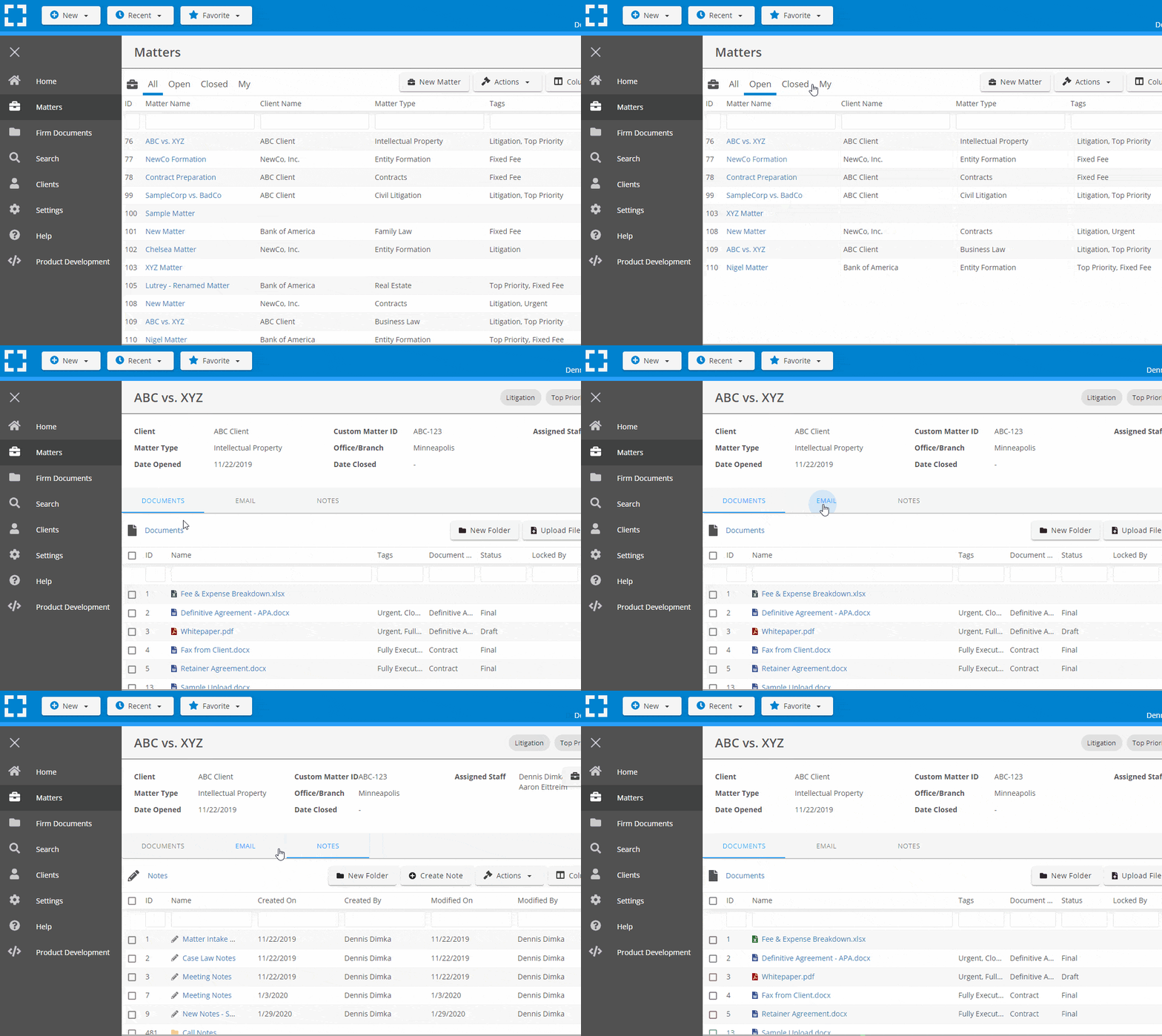
Organize by Client & Matter
Organize documents, email and notes by client or matter. Store and manage all data for a case or project in one place.
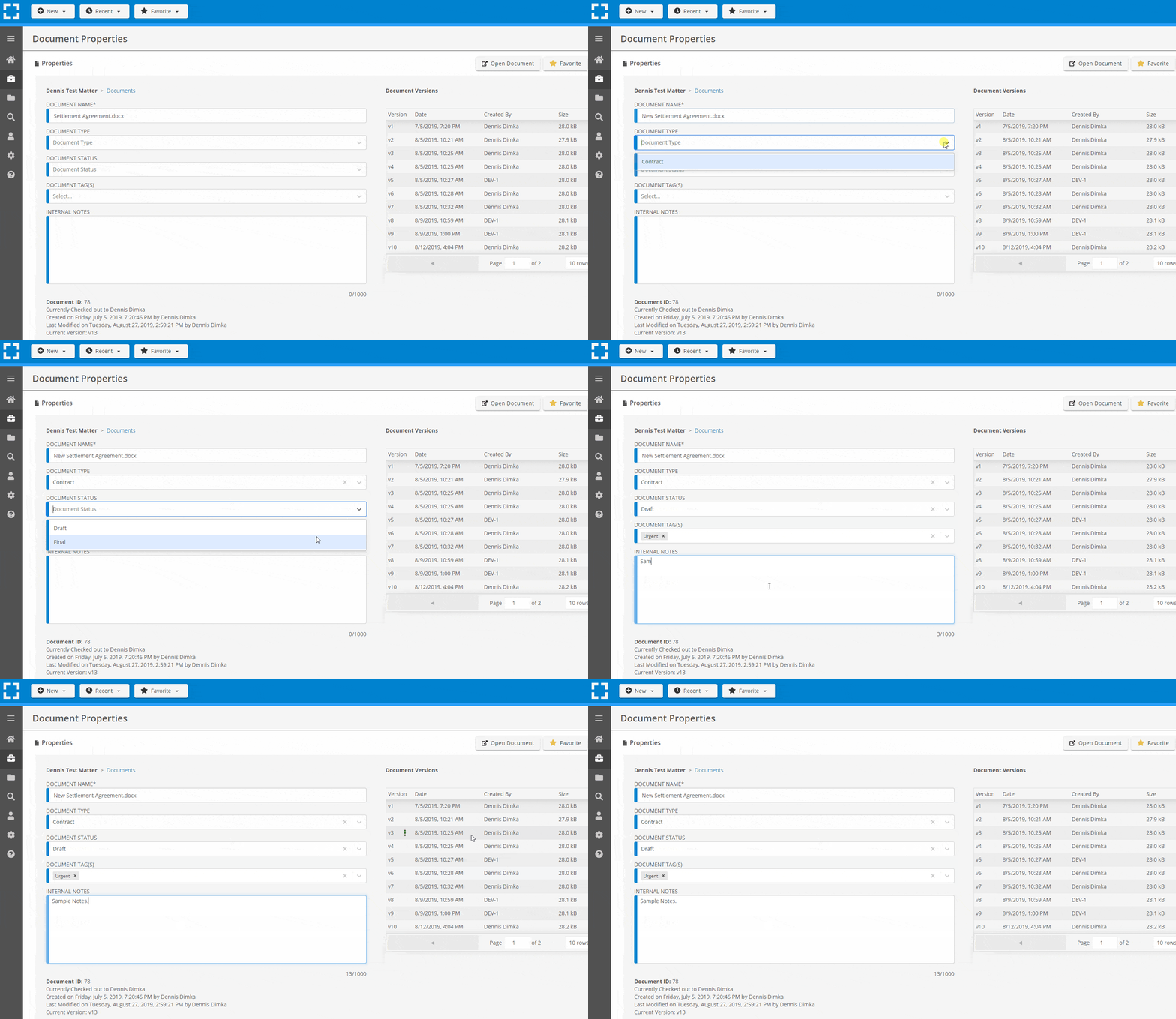
Go Beyond Basic Files & Folders
Supercharge your firm’s productivity with true DMS functions.
- Version Management
- Document Tagging & Profiling
- Document Check-Out / Check-In
- Microsoft Office Integration
- Automatic, Integrated OCR
- Convert Word Docs to PDF
Search Everything
LexWorkplace is like Google for your law firm. Search across millions of pages, documents, folder email and notes in seconds. Refine your search by matter, document type, author and more.
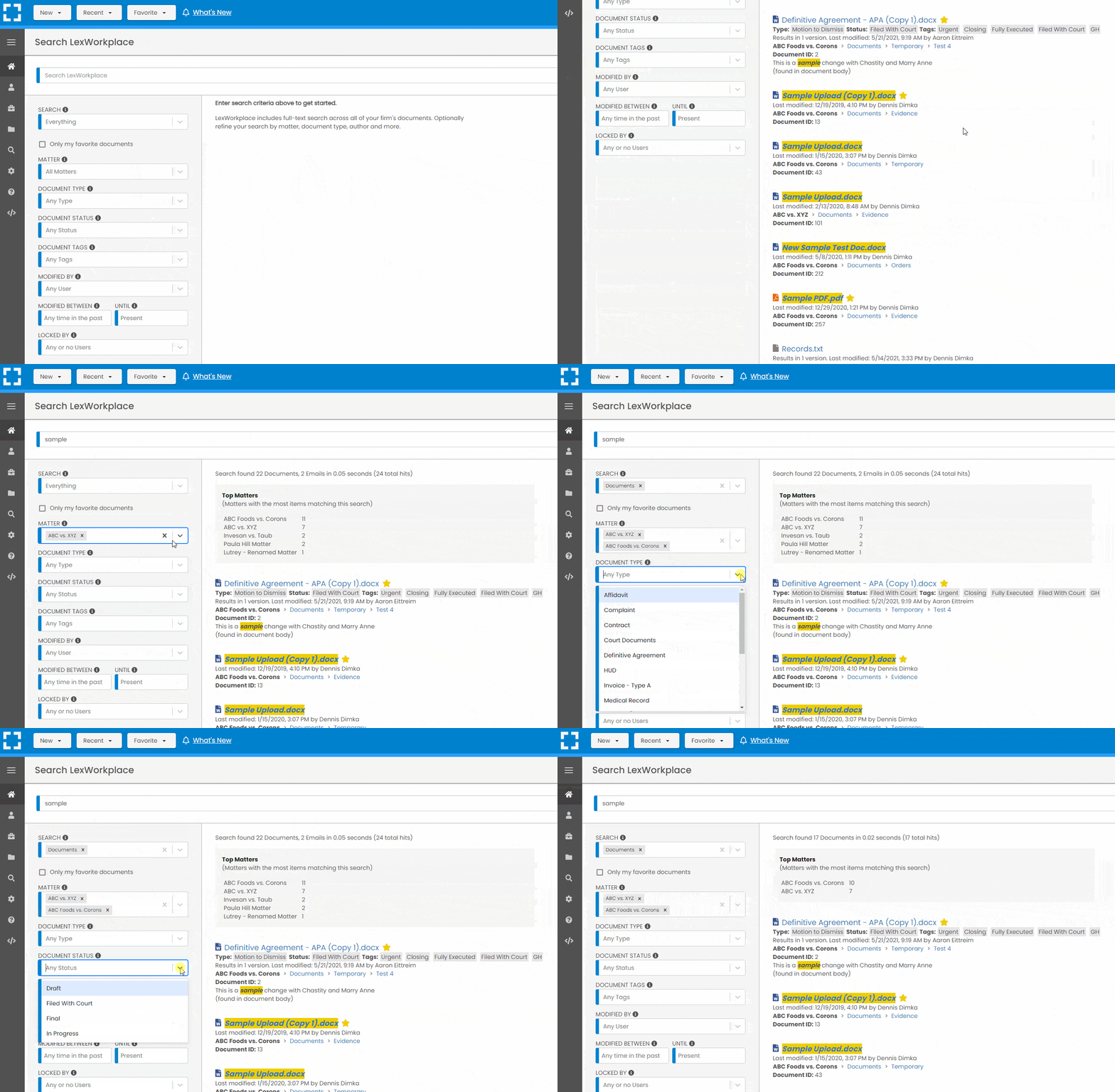
Search by…
- Client or Matter
- Document Type (Contract, Complaint, Order, etc.)
- Document Status (Draft, Final, etc.)
- Document Tags (Filed With Court, Fully Executed, etc.)
Outlook Integration + Comprehensive Email Management
Save emails to a matter without leaving Outlook. Saved emails are accessible to your entire team, organized and searchable.
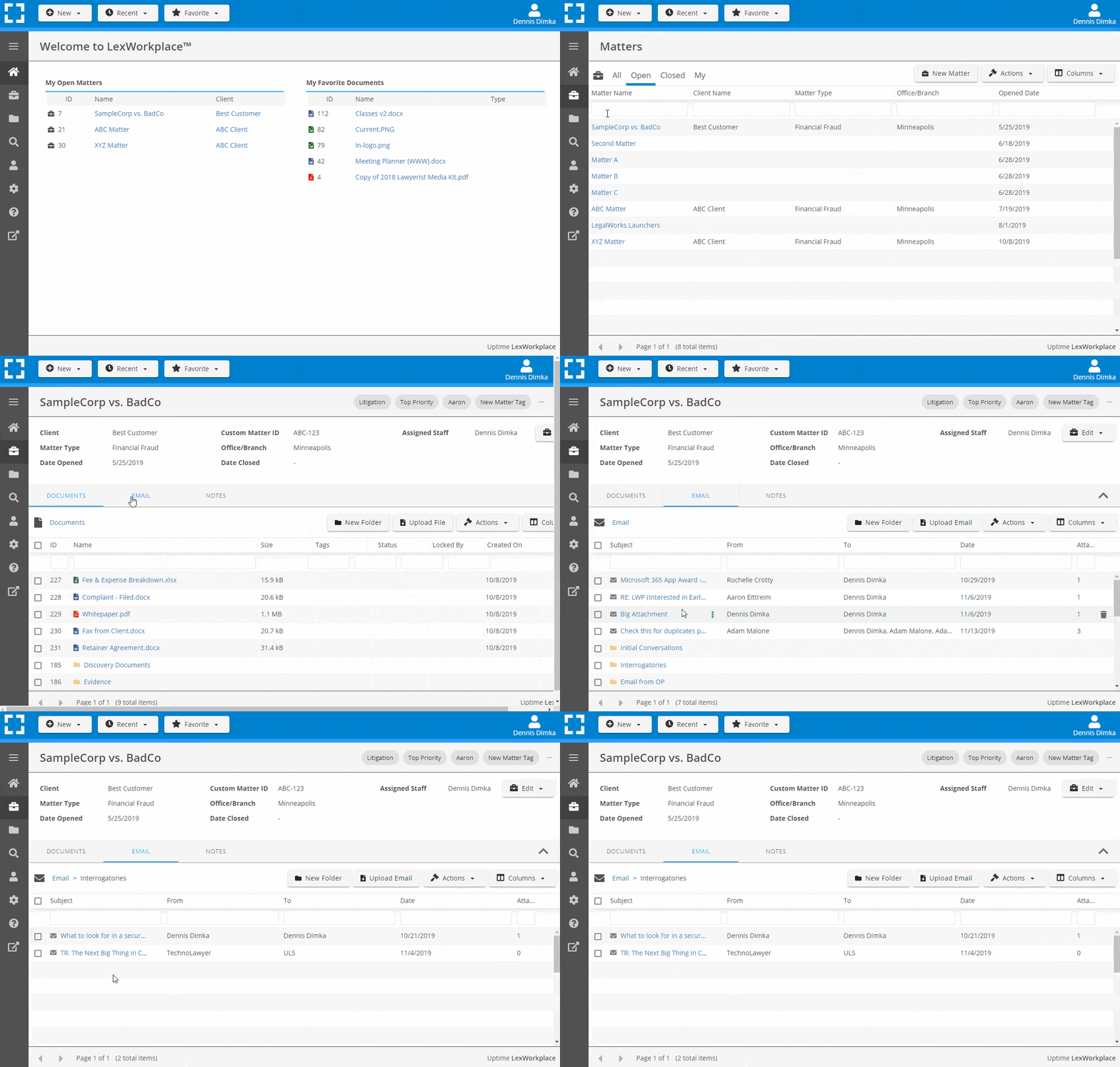
- Outlook Add-In that Works With Windows and Macs
- Save Entire, Original Email to a Matter in a LexWorkplace
- Email De-Duplication
- Organize Emails into Folders, Subfolders
Works with Windows and Macs
All of LexWorkplace is compatible with both Windows and Mac computers.
Next Steps
See What Clients Have to Say
Lawyers love LexWorkplace. See how the system streamlined one lawyer’s practice.

Watch the 5-Minute Demo
See LexWorkplace in action in our quick 5-minute overview and demonstration.
Or, if you want a one-on-one demo, or want to talk about LexWorkplace for your firm, schedule a call or demo below.
You Might Also Like
How Email Attachments Should Be Stored in a Legal DMS
When to file attachments with the email…

Why Email and Document Management Should Be Integrated for Law Firms
Learn why law firms should manage email…

Why Law Firms Can’t Afford to Delay DMS Migration — And How to Switch Smoothly
Tired of costly, stressful tech…
Want More Legal Technology Tips?
Subscribe to Uptime Legal to get the latest legal tech tips and trends, delivered to your inbox weekly.